Beantwoord

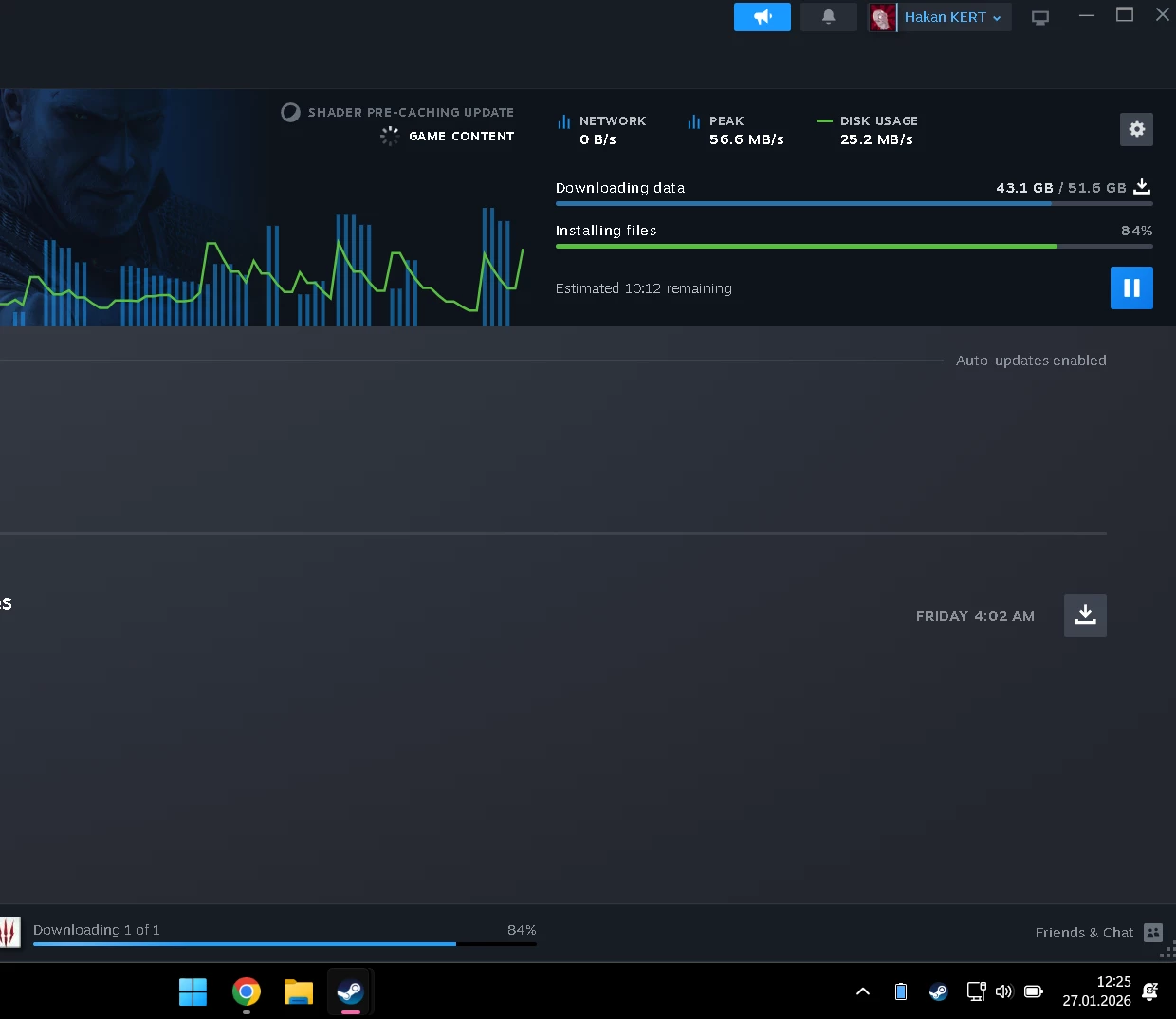
Steam downloads extremely slow/capping at ~20 MB/s despite 1000/1000 Mbps speedtest results

  • January 26, 2026
  • 23 reacties
  • 180 Bekeken

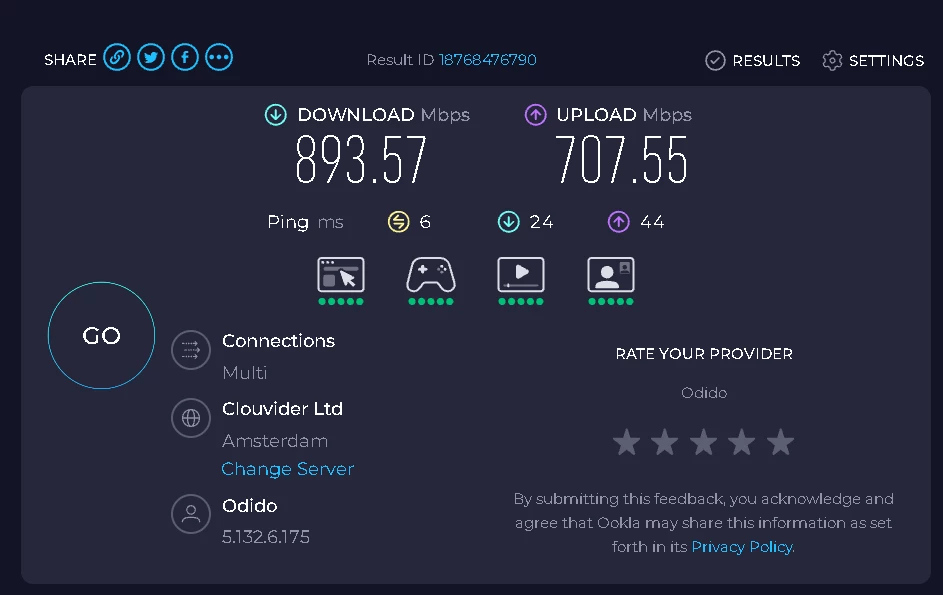
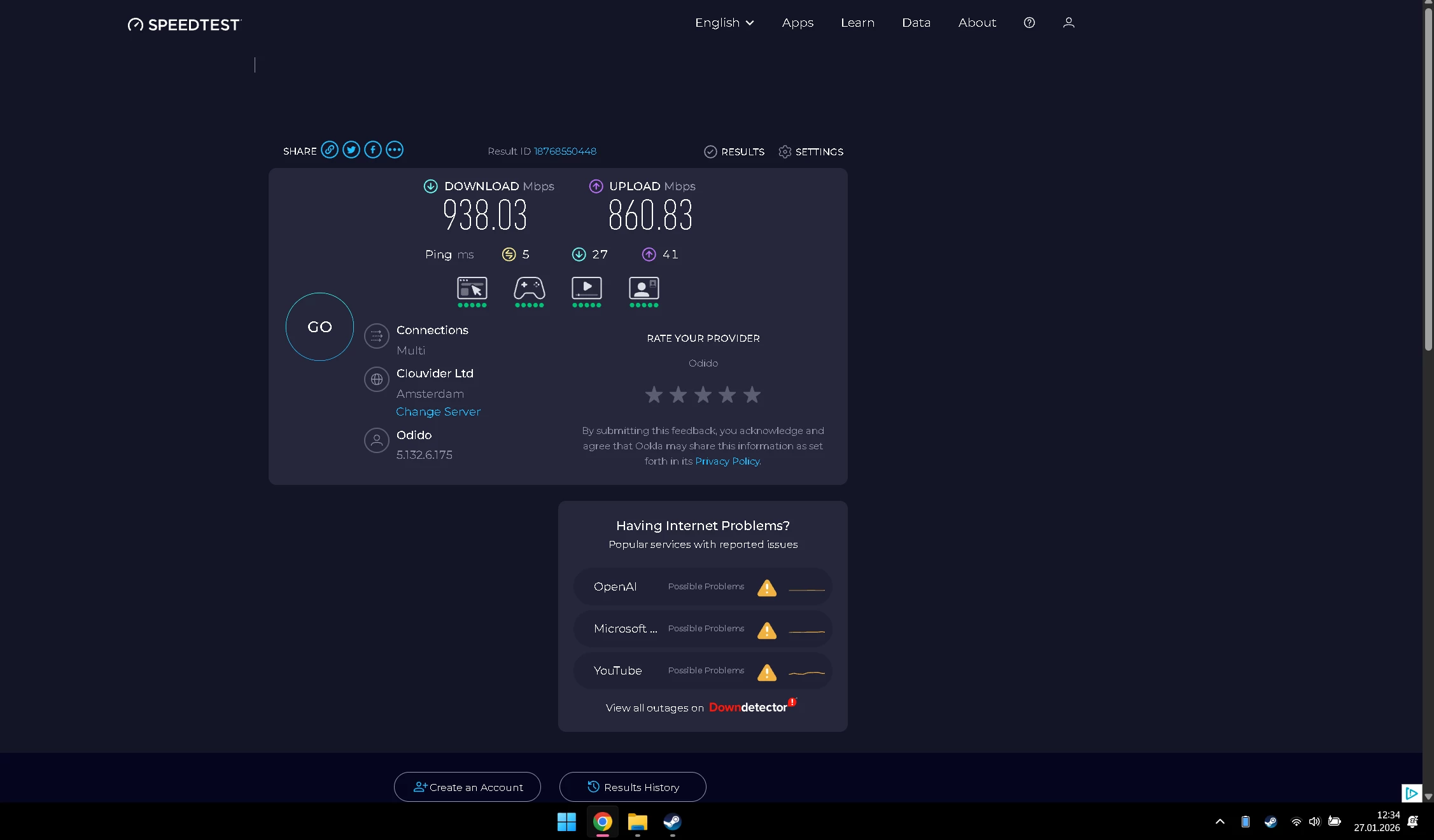
I have Odido fiber internet (1000/1000 Mbps plan) at home in Den Haag (South Holland). Speedtest results (Ookla/speedtest.net) show full speeds consistently: around 900-1000 Mbps download and upload, with no problems or packet loss. Downloads from Epic Games are mostly stable and closer to expected speeds.
However, Steam downloads are severely affected and do not reflect my line speed:
•  Without any VPN/WARP: Downloads frequently drop to 0 KB/s, become unstable, and often stop completely.
•  With Cloudflare WARP (free version enabled): More stable, but speed is capped at around 20 MB/s (~160 Mbps max), far below my 1000 Mbps line capacity. Even with WARP, the PC cannot achieve the full download speed I see on speedtests.
•  I have tried the following troubleshooting steps:
    •  Changing Steam download region multiple times (Netherlands, Germany, France, Belgium, Luxembourg, etc.)
    •  MTU set to 1492 on Wi-Fi interface (via netsh interface ipv4 set subinterface “Wi-Fi” mtu=1492 store=persistent)
    •  NetworkThrottlingIndex set to ffffffff (hexadecimal) in Windows registry to disable throttling
    •  Using 5 GHz Wi-Fi only (separate SSIDs for 2.4/5 GHz)
    •  Clearing Steam download cache, setting no bandwidth limit in Steam settings
    •  Testing via Ethernet connection (same issue persists)
This discrepancy (full speed on speedtest but very low on Steam/PC downloads) points to a possible peering/routing issue on Odido’s side to Valve/Steam CDN servers (likely AMSIX or Frankfurt routes), as similar complaints from Odido fiber users in the Randstad area (Den Haag/Rotterdam) appear in community threads and Dutch forums – especially high latency, capping, or throttling on specific CDNs despite excellent speedtest results.
Traceroute results (from CMD: tracert content.steampowered.com or cache6-ams1.steamcontent.com) show high latency or timeouts in some hops – I can attach screenshots. Speedtest screenshots also attached showing 1000 Mbps.
VPN/WARP partially bypasses the issue (stabilizes but caps speed), suggesting the problem is with Odido’s peering or routing to certain external services like Steam.
Could you please investigate this for the Den Haag area? Check for known peering issues, congestion, or fixes with Valve CDN. If needed, escalate to the peering/network team or suggest alternative routing/modem check.
Thank you for your assistance!

 

Beste antwoord door hakan kert

I downloaded a 1GB file in 5 seconds on https://speed.transip.nl/

Should be about 8 seconds with a 1Gbps line, but yes, that seems correct.

You can try the 1TB file there and see if that keeps a stable download. But my guess is that the problem with Steam isn’t you internet-speed/line.


It says there are 3 hours left to download the 1TB file. I think the problem is with Steam.

Bekijk origineel

23 reacties

Waqqas
Super User
Forum|alt.badge.img+15
  • Odido Superuser
  • January 27, 2026

Hello ​@hakan kert 

What you can also try is:

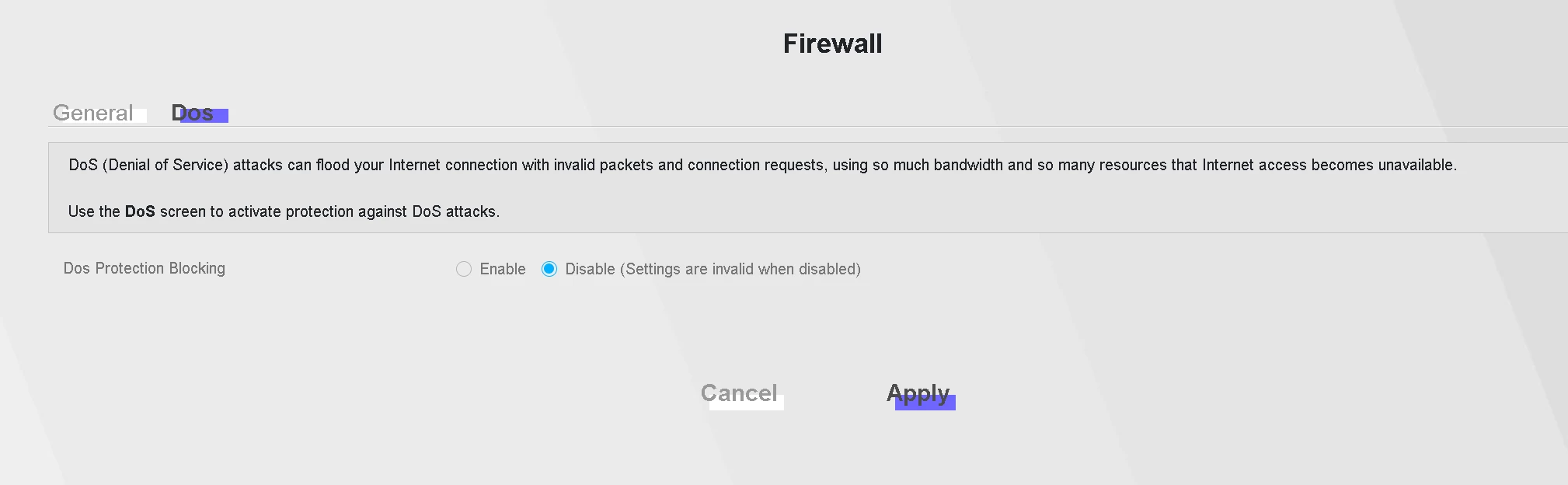
In your browser go to 192.168.1.1 and log in with admin and the Login Password behind your router. In the menu go to beveiliging, firewall, Dos, turn it off and click on toepassen.


  • Auteur
  • is een Top Poster
  • January 27, 2026

Hello ​@hakan kert 

What you can also try is:

In your browser go to 192.168.1.1 and log in with admin and the Login Password behind your router. In the menu go to beveiliging, firewall, Dos, turn it off and click on toepassen.

I try it but it didn’t work.


  • is een King Poster
  • January 27, 2026

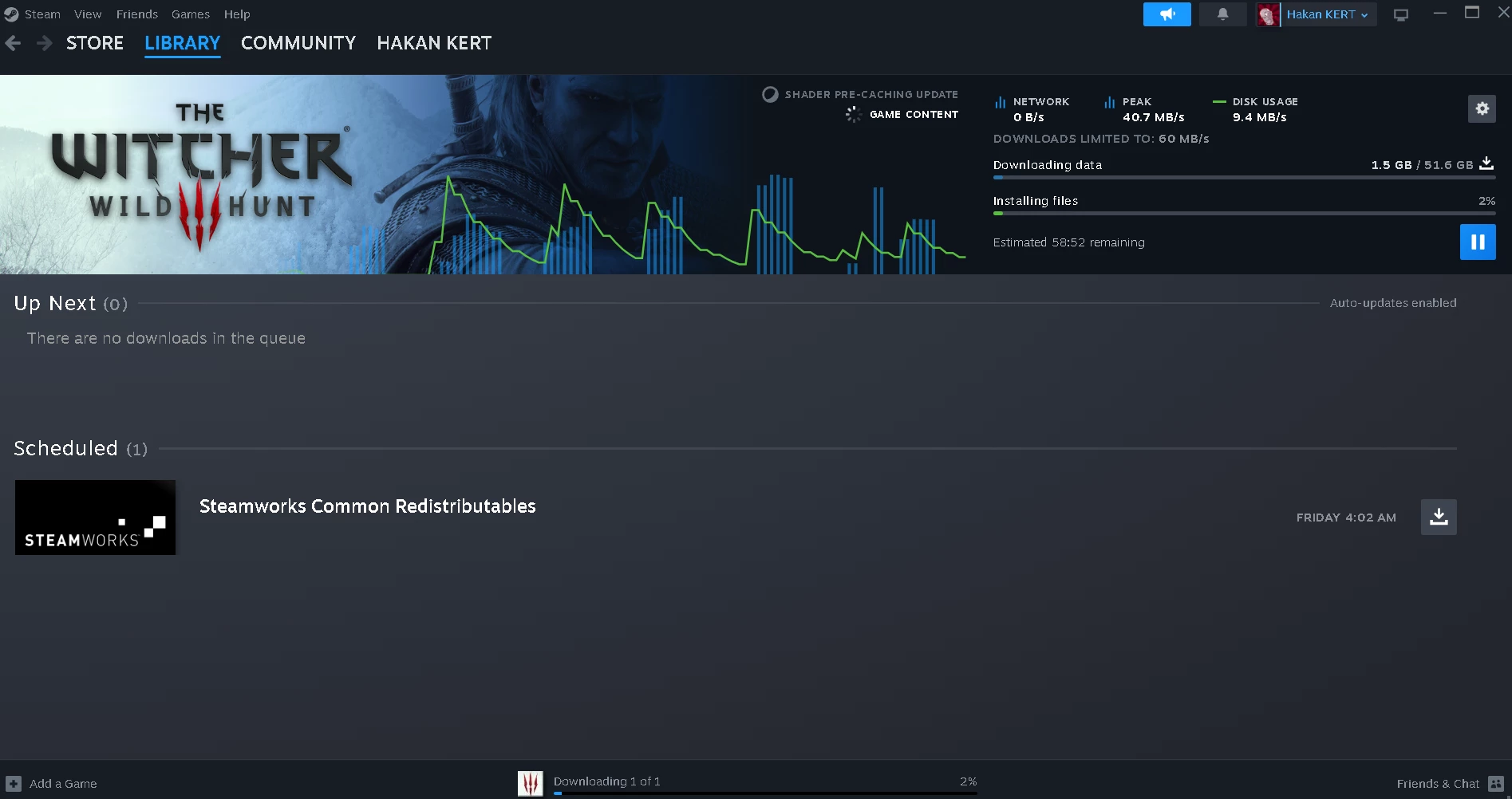
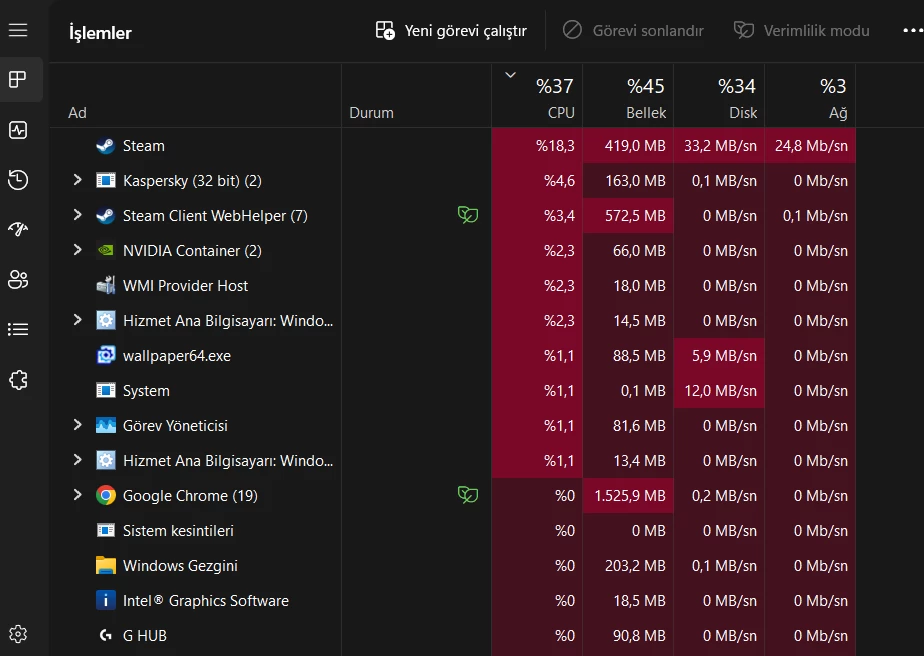
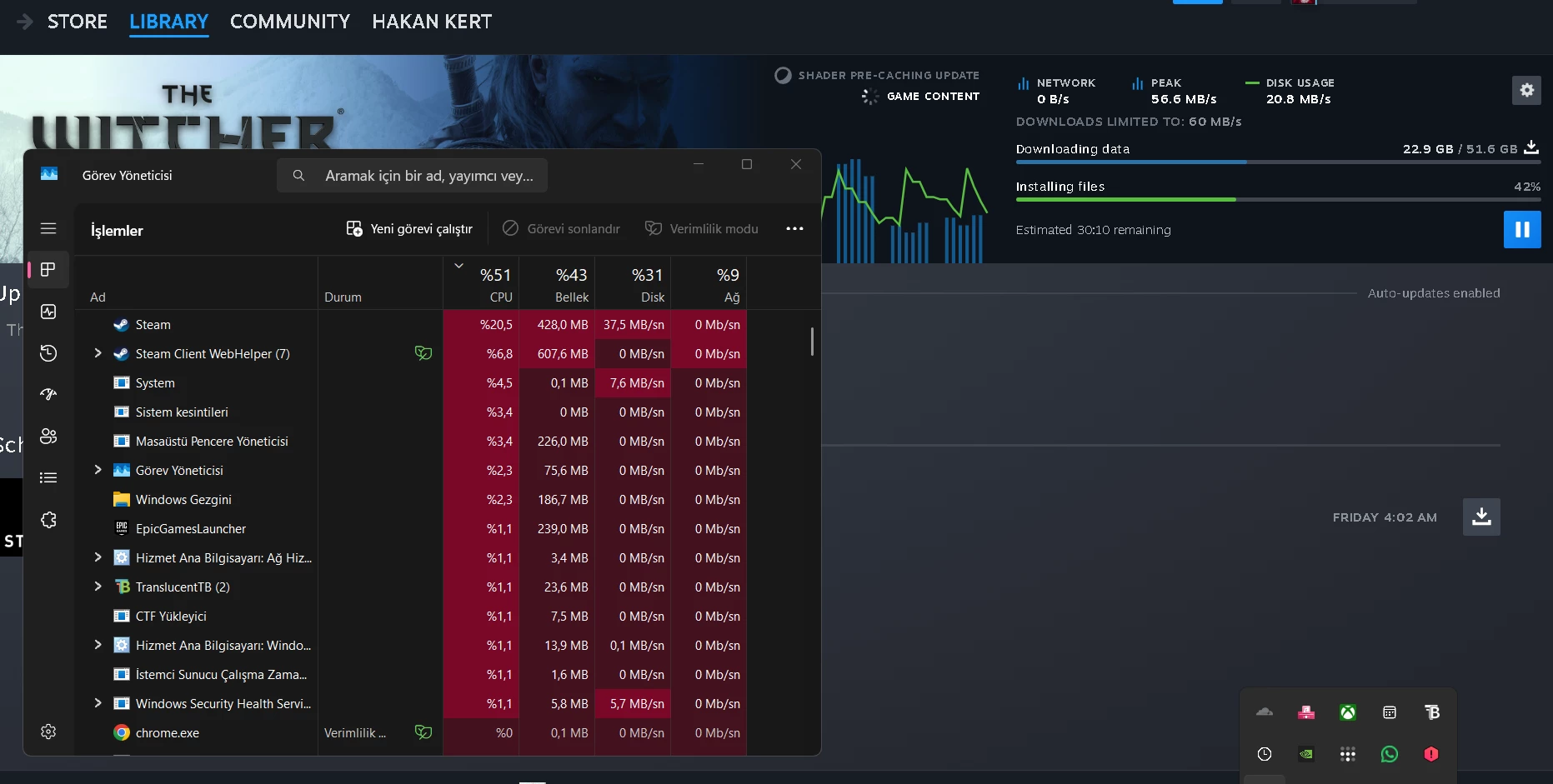
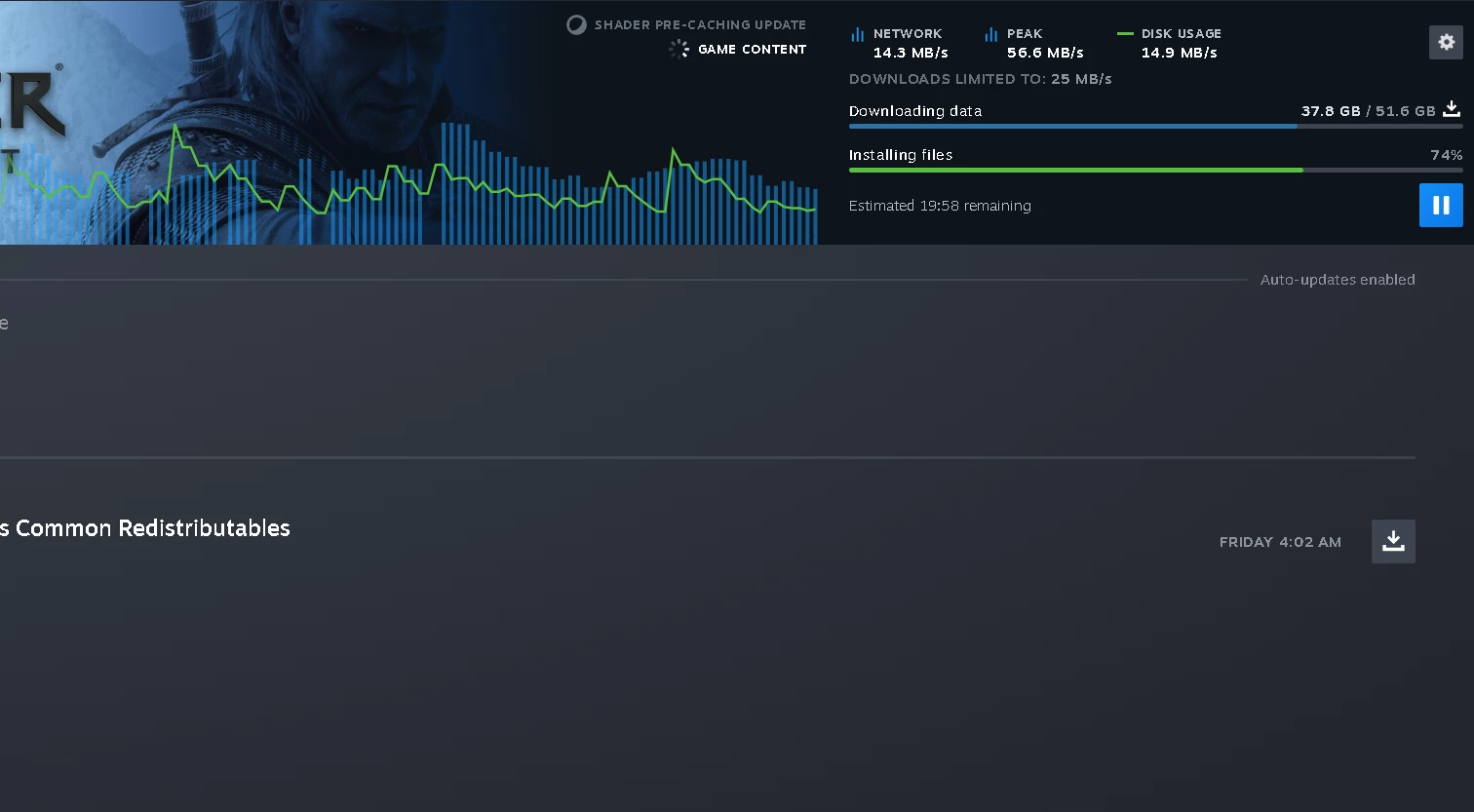
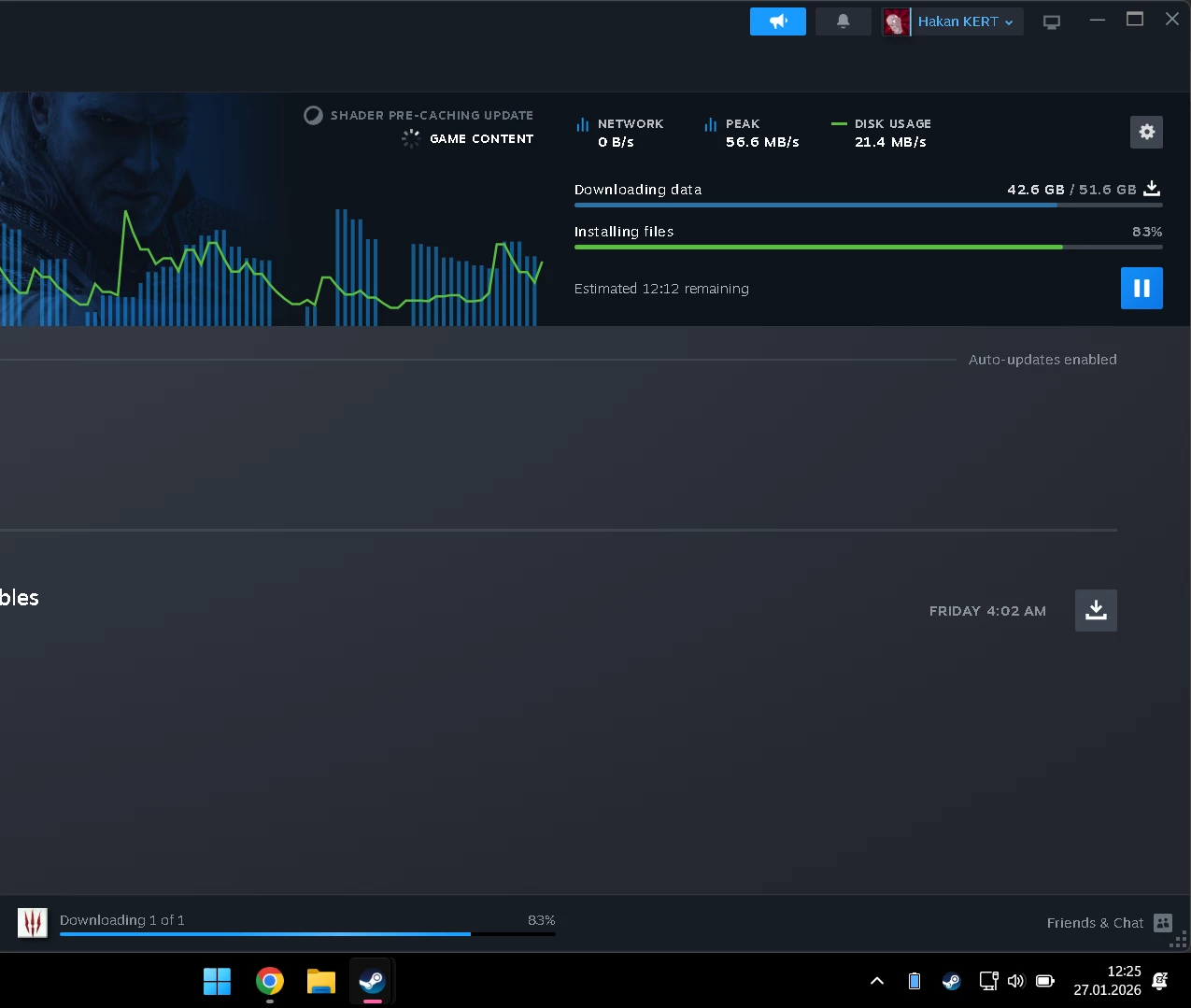
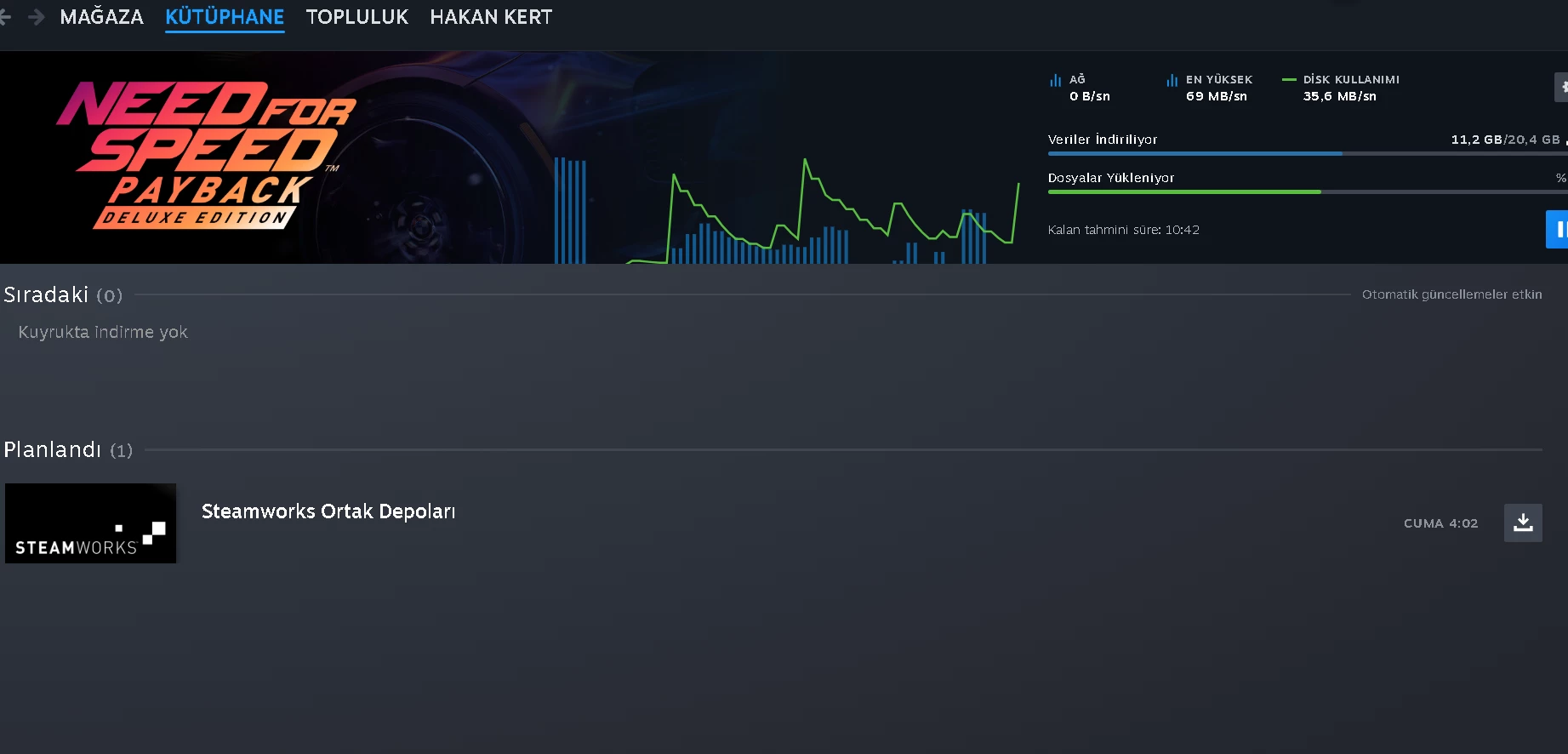
Judging by the saw-pattern of the download speeds, can you check task manager during a download? This seems a bit like a CPU or storage (HDD) bottleneck, where it spends time processing a chunk before downloading the next.


  • Auteur
  • is een Top Poster
  • January 27, 2026

Judging by the saw-pattern of the download speeds, can you check task manager during a download? This seems a bit like a CPU or storage (HDD) bottleneck, where it spends time processing a chunk before downloading the next.

I don't think it will be a bottleneck because I have an M2 SSD, not an HDD.


rvk01
  • January 27, 2026

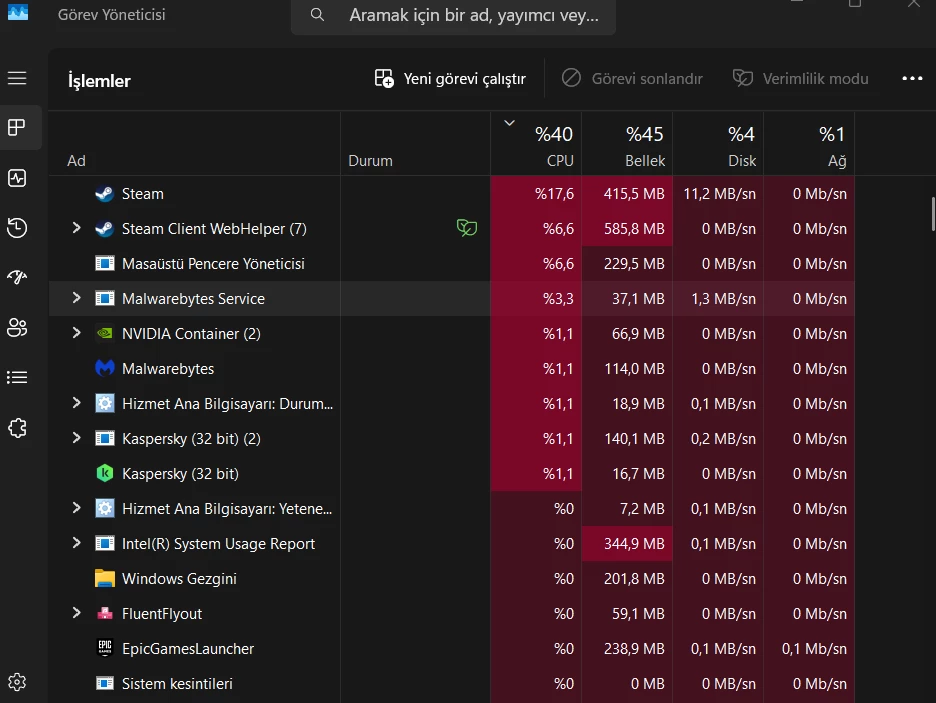
You have both malwarebytes and kaspersky. Both can interfere with downloads (i.e. checking for virus etc during download).

Did you try disabling both temporarily.

In the taskmanager, do you see a process come on top when you get a dip in speed?


  • Auteur
  • is een Top Poster
  • January 27, 2026

You have both malwarebytes and kaspersky. Both can interfere with downloads (i.e. checking for virus etc during download).

Did you try disabling both temporarily.

In the taskmanager, do you see a process come on top when you get a dip in speed?


I closed both apps but it's still the same.


Waqqas
Super User
Forum|alt.badge.img+15
  • Odido Superuser
  • January 27, 2026

Hello ​@hakan kert 

What you can also try is:

In your browser go to 192.168.1.1 and log in with admin and the Login Password behind your router. In the menu go to beveiliging, firewall, Dos, turn it off and click on toepassen.

I try it but it didn’t work.


​@hakan kert 

Did you restart the router after this?


rvk01
  • January 27, 2026

Does it also show a jigsaw when you use https://speedtest.net?

Try setting the limit on downloadspeed to 40MB/s or 30MB/s (instead of 60MB/s).
Does it show the same jigsaw then?


  • Auteur
  • is een Top Poster
  • January 27, 2026

Hello ​@hakan kert 

What you can also try is:

In your browser go to 192.168.1.1 and log in with admin and the Login Password behind your router. In the menu go to beveiliging, firewall, Dos, turn it off and click on toepassen.

I try it but it didn’t work.


​@hakan kert 

Did you restart the router after this?

no, did I need to restart it?


  • Auteur
  • is een Top Poster
  • January 27, 2026

Does it also show a jigsaw when you use https://speedtest.net?

Try setting the limit on downloadspeed to 40MB/s or 30MB/s (instead of 60MB/s).
Does it show the same jigsaw then?


Ama sorun şu ki, bu internet bağlantısıyla 100 mb/s indirme hızı almam gerekmez miydi?

Normally it goes above 1000, but right now it shows 900 because I'm downloading something, as if I'm not using the internet at all.


rvk01
  • January 27, 2026

Does it also show a jigsaw when you use https://speedtest.net?

Try setting the limit on downloadspeed to 40MB/s or 30MB/s (instead of 60MB/s).
Does it show the same jigsaw then?

But the problem is, shouldn't I be getting 100mb/s download speed with this internet connection?

You mean 100MB/s? No, that depends on a lot of other factors too. Both internal and external.

That’s why I asked these questions… to see what could cause this.
Besides that… I see lots of messages (on other forums) about fluctuating download speed in Steam.


rvk01
  • January 27, 2026

BTW Are you on wifi? Did you try with a cable?

also… did you reset the MTU back to default?
and all the other settings you messed with 😉


  • Auteur
  • is een Top Poster
  • January 27, 2026

Does it also show a jigsaw when you use https://speedtest.net?

Try setting the limit on downloadspeed to 40MB/s or 30MB/s (instead of 60MB/s).
Does it show the same jigsaw then?

But the problem is, shouldn't I be getting 100mb/s download speed with this internet connection?

You mean 100MB/s? No, that depends on a lot of other factors too. Both internal and external.

That’s why I asked these questions… to see what could cause this.
Besides that… I see lots of messages (on other forums) about fluctuating download speed in Steam.


More stable, but still slow.


  • Auteur
  • is een Top Poster
  • January 27, 2026

BTW Are you on wifi? Did you try with a cable?

also… did you reset the MTU back to default?
and all the other settings you messed with 😉


I didn't touch the MTU setting again. Yes, I'm connected via Wi-Fi. I'll go to the living room, connect my laptop with a cable, and try the speed again. Do I need to re-enable IPv6 or anything like that? I've read a lot of articles about it.


rvk01
  • January 27, 2026

BTW Are you on wifi? Did you try with a cable?

also… did you reset the MTU back to default?
and all the other settings you messed with 😉

I didn't touch the MTU setting again. Yes, I'm connected via Wi-Fi. I'll go to the living room, connect my laptop with a cable, and try the speed again. Do I need to re-enable IPv6 or anything like that? I've read a lot of articles about it.

Odido doesn’t use IPv6 so that doesn’t matter. All the other things you tried in the openingspost (like MTU, NetworkThrottlingIndex etc) need to be undone.

But this could just be a case of wifi congestion. See what speeds you get with steam and speedtest.net when attached to a cable.


  • Auteur
  • is een Top Poster
  • January 27, 2026

BTW Are you on wifi? Did you try with a cable?

also… did you reset the MTU back to default?
and all the other settings you messed with 😉

I didn't touch the MTU setting again. Yes, I'm connected via Wi-Fi. I'll go to the living room, connect my laptop with a cable, and try the speed again. Do I need to re-enable IPv6 or anything like that? I've read a lot of articles about it.

Odido doesn’t use IPv6 so that doesn’t matter. All the other things you tried in the openingspost (like MTU, NetworkThrottlingIndex etc) need to be undone.

But this could just be a case of wifi congestion. See what speeds you get with steam and speedtest.net when attached to a cable.

i try it with cable. its worst than before.


  • Auteur
  • is een Top Poster
  • January 27, 2026

BTW Are you on wifi? Did you try with a cable?

also… did you reset the MTU back to default?
and all the other settings you messed with 😉

I didn't touch the MTU setting again. Yes, I'm connected via Wi-Fi. I'll go to the living room, connect my laptop with a cable, and try the speed again. Do I need to re-enable IPv6 or anything like that? I've read a lot of articles about it.

Odido doesn’t use IPv6 so that doesn’t matter. All the other things you tried in the openingspost (like MTU, NetworkThrottlingIndex etc) need to be undone.

But this could just be a case of wifi congestion. See what speeds you get with steam and speedtest.net when attached to a cable.

i try it with cable. its worst than before.

 
I was getting better speeds on my internet with klik en klaar.


rvk01
  • January 27, 2026

And the speedtest.net?

If that's also worse then you need a different cable. It should always be higher and more stable than wifi.


  • Auteur
  • is een Top Poster
  • January 27, 2026

And the speedtest.net?

If that's also worse then you need a different cable. It should always be higher and more stable than wifi.


The cable modem came out of the box, it can't be bad, I guess, I don't know.

According to the site, there are no problems.


rvk01
  • January 27, 2026

And the speedtest.net?

If that's also worse then you need a different cable. It should always be higher and more stable than wifi.

The cable modem came out of the box, it can't be bad, I guess, I don't know.

Those results from speedtest.net are much better.

Another test you can do is download one of the 1GB files from http://speed.transip.nl/ and look at the download-tab/page in Chrome to see the speed.

Your jigsaw pattern during download could also be due to either the external server or even writing the buffer to disk (in which case it also drops because it needs to do something else than download).

According to this… steam downloads are also compressed. So it needs to unpack parts during download which can also result in those dips.

https://www.reddit.com/r/SteamDeck/comments/17t204m/why_does_my_download_graph_always_look_like_a/


  • Auteur
  • is een Top Poster
  • January 27, 2026

And the speedtest.net?

If that's also worse then you need a different cable. It should always be higher and more stable than wifi.

The cable modem came out of the box, it can't be bad, I guess, I don't know.

Those results from speedtest.net are much better.

Another test you can do is download one of the 1GB files from http://speed.transip.nl/ and look at the download-tab/page in Chrome to see the speed.

Your jigsaw pattern during download could also be due to either the external server or even writing the buffer to disk (in which case it also drops because it needs to do something else than download).

According to this… steam downloads are also compressed. So it needs to unpack parts during download which can also result in those dips.

https://www.reddit.com/r/SteamDeck/comments/17t204m/why_does_my_download_graph_always_look_like_a/


I downloaded a 1GB file in 5 seconds on https://speed.transip.nl/

I also checked the Reddit thread; the guy was installing games on an SD card, isn't it normal to have these kinds of problems? M2 SSDs can't have the same power. They're talking about SteamDeck.


rvk01
  • January 27, 2026

I downloaded a 1GB file in 5 seconds on https://speed.transip.nl/

Should be about 8 seconds with a 1Gbps line, but yes, that seems correct.

You can try the 1TB file there and see if that keeps a stable download. But my guess is that the problem with Steam isn’t you internet-speed/line.


  • Auteur
  • is een Top Poster
  • Antwoord
  • January 27, 2026

I downloaded a 1GB file in 5 seconds on https://speed.transip.nl/

Should be about 8 seconds with a 1Gbps line, but yes, that seems correct.

You can try the 1TB file there and see if that keeps a stable download. But my guess is that the problem with Steam isn’t you internet-speed/line.


It says there are 3 hours left to download the 1TB file. I think the problem is with Steam.