Beantwoord

No internet connection

  • December 10, 2020
  • 2 reacties
  • 196 Bekeken

I received the installation pack and an email saying that I can connect it from 05/12/2020, and that they are already providing the service. But after properly connecting the modem, there's no internet connection.

I HAVE BEEN WAITING IN THE CUSTOMER SERVICE LINE FOR MORE THAN AN HOUR.

NONE OF THE ONLINE SOLUTIONS WORK.

Please check if you are sending the signal or send a technician to my home. 
Beste antwoord door Jason van Odido

Hi @jeronimocm, welcome to the Community!

I've checked your subscription and it seems like you only have a working COAX-connection (Ziggo) at home, is that correct? You've also cancelled the order, are you 100% sure there's no available ISRA (main installation point for DSL) at home? Like @Marcel MCi said, can you please post a photo of the modem and your installation point. That way I'll be able to verify whether it's an ISRA or not. 

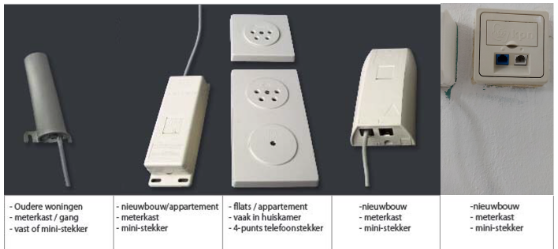
The four main ISRA's resemble these:

Please be sure to check the fuse box and your living room connection. Sometimes ISRA's are tucked away behind furniture on a wall-socket.

Bekijk origineel

2 reacties

Marcel MCi
Forum|alt.badge.img+2
  • is een gewaardeerde antwoordgever
  • December 12, 2020

Hello jeronimocm,

Did the installation went well? You have connected the modem directly to the "ISRA point" with a short DSL-cable? The WAN and internet lights are not blinking or green / red?

Probably you can post a photo of the installation, so we can give you some tips if needed.

Otherwise please wait on a moderator. (Can take a while due to the weekend) They can check or start action.

Regards,

Marcel


Jason van Odido
Moderator
Forum|alt.badge.img+17

Hi @jeronimocm, welcome to the Community!

I've checked your subscription and it seems like you only have a working COAX-connection (Ziggo) at home, is that correct? You've also cancelled the order, are you 100% sure there's no available ISRA (main installation point for DSL) at home? Like @Marcel MCi said, can you please post a photo of the modem and your installation point. That way I'll be able to verify whether it's an ISRA or not. 

The four main ISRA's resemble these:

Please be sure to check the fuse box and your living room connection. Sometimes ISRA's are tucked away behind furniture on a wall-socket.