Beantwoord

Internetsnelheid wordt niet behaald.


Goedenacht,


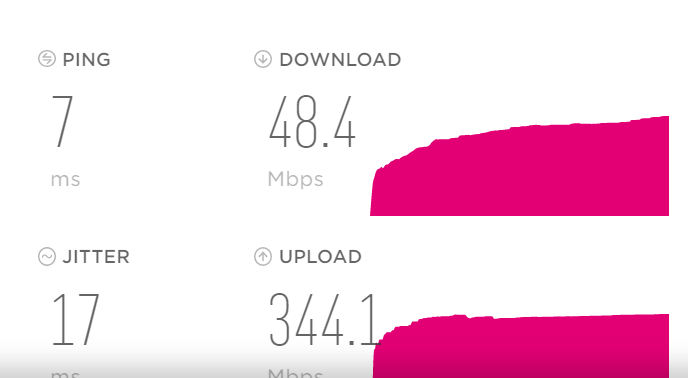
Het valt me op dat mijn download en upload snelheid maximaal 50Mbit is. Ik heb Internet Premium en kan 1000Mbit halen, voorheen was dit ook ongeveer 950Mbit up en down, maar nu kom ik niet hoger dan 50Mbit up en down.


Zijn er meer mensen die hier last van hebben?

Beste antwoord door remivandijk

Hoi @Jason ,


Dat klopt, ik heb een OpnSense firewall, maar had voor alle zekerheid ook getest met het modem van Tmobile.

Wat me wel opviel is dat de laptop en pc waarop ik getest heb, dezelfde Realtek netwerkkaarten heeft. Ik heb ook nog een Linux server draaien waarop ik ook een speedtest heb gedaan die wel een hogere snelheid haalt, dus ik krijg het idee dat het aan de netwerkkaart van de laptop en pc ligt. Ik heb drivers geüpdatet maar dat heeft het nog niet verholpen. Ik heb nu een losse netwerkkaart besteld om te kijken hoe dat gaat. Ik heb dus vanmiddag wel snelheden gezien van 950Mbit. Ik denk dus dat het T-Mobile netwerk verder goed staat.


Bekijk origineel

26 reacties

Waqqas
Super User
Forum|alt.badge.img+15
  • Odido Superuser
  • August 19, 2020

Hallo @remivandijk 

Na een herstart van je modem of mediaconverter meet je de snelheid met een laptop direct bekabeld op de modem met minimaal een CAT5e kabel en via de Ookla speedtest desktop app?

Kijk anders eens hoe je snelheid is op een andere laptop en in je T-Mobile thuis account staat internet premium aan?

Als laatste kan je ook nog een fabrieksreset proberen door het resetknopje achter de modem voor ongeveer 10 seconden in te drukken met een paperclip bijvoorbeeld.


  • is een Top Poster
  • August 19, 2020

I have the same problem and about the same amount of speed.


  • Auteur
  • is een nieuwe Poster
  • August 19, 2020

Hallo @Waqqas ,

Ik heb eerst een herstart van media converter en modem geprobeerd, hierna hetzelfde resultaat. Daarna heb ik een factory reset van het modem uitgevoerd en nogmaals geprobeerd maar ook nog geen resultaat.

Ik heb een laptop en vaste pc geprobeerd, beiden direct verbonden met een CAT6 kabel en beiden hebben een gigabit ethernet poort.

Ik kom gewoon niet boven 50Mbit uit. Ik zou bijna zeggen dat ze mijn verbinding op 50Mbit geshaped hebben alsof ik Internet Basis heb zegmaar.


  • Auteur
  • is een nieuwe Poster
  • August 19, 2020

Ik gebruik trouwens de Ookla speedtest via hun website en ik heb de T-Mobile speedtest gebruikt (t-mobile.nl/thuis/internet/speedtest).


Waqqas
Super User
Forum|alt.badge.img+15
  • Odido Superuser
  • August 19, 2020

@remivandijk

En dat heb je ook voor de zekerheid gecontroleerd gecontroleerd in je T-Mobile account premium of basic?

Welke modem heb je?

Bij een Zyxel kan je bijvoorbeeld via 192.168.1.1 inloggen en dan in het overzicht of klik op > naast systeem informatie en daar staat dan welke snelheid er binnenkomt.

Je kan beter de Ookla speedtest app in de Microsoft store downloaden.


  • Auteur
  • is een nieuwe Poster
  • August 19, 2020

Hallo @Waqqas ,

Dankjewel voor je snelle reactie. Ik zal in het modem inloggen en even kijken. 

In mijn-tmobilethuis staat dat Internet Premium actief is in ieder geval.

Via de applicatie krijg ik hetzelfde resultaat helaas.


Jason van Odido
Moderator
Forum|alt.badge.img+17

Hoi @remivandijk, goed dat je het aangeeft, zo kunnen we je zo goed mogelijk helpen met zijn alle!

@Waqqas heeft al een aantal goede tips uitgedeeld, het enige wat ik daaraan wil toevoegen, of nou ja eigenlijk meer vragen, is het volgende: het valt me op in de lijnanalyse dat het modem niet uitgelezen wordt. Heb je er momenteel een ander modem of andere router tussen/achter zitten? 


  • Auteur
  • is een nieuwe Poster
  • Antwoord
  • August 19, 2020

Hoi @Jason ,


Dat klopt, ik heb een OpnSense firewall, maar had voor alle zekerheid ook getest met het modem van Tmobile.

Wat me wel opviel is dat de laptop en pc waarop ik getest heb, dezelfde Realtek netwerkkaarten heeft. Ik heb ook nog een Linux server draaien waarop ik ook een speedtest heb gedaan die wel een hogere snelheid haalt, dus ik krijg het idee dat het aan de netwerkkaart van de laptop en pc ligt. Ik heb drivers geüpdatet maar dat heeft het nog niet verholpen. Ik heb nu een losse netwerkkaart besteld om te kijken hoe dat gaat. Ik heb dus vanmiddag wel snelheden gezien van 950Mbit. Ik denk dus dat het T-Mobile netwerk verder goed staat.


Jason van Odido
Moderator
Forum|alt.badge.img+17

Aah goed om te horen, bedankt voor je terugkoppeling! 💪😎

Welke Realtek netwerkkaart zit er in je PC en laptop? Dan kan ik gelijk checken of die snelheid inderdaad niet haalbaar is. Top dat je meteen een nieuwe besteld hebt! Als ik toch iets voor je kan doen, schiet me dan aan. De Community helpt heel graag mee! 


  • is een Top Poster
  • August 19, 2020

Seams that I`m the one with a problem than. :sweat:


Waqqas
Super User
Forum|alt.badge.img+15
  • Odido Superuser
  • August 19, 2020

@juangp3 

Have you tried all of the above steps?

Only use the T-Mobile modem, connect a laptop to your modem and perform a speedtest using the Ookla speedtest desktop app.

Try using another laptop or test after a factory reset.


  • is een Top Poster
  • August 20, 2020

@juangp3

Have you tried all of the above steps?

Only use the T-Mobile modem, connect a laptop to your modem and perform a speedtest using the Ookla speedtest desktop app.

Try using another laptop or test after a factory reset.


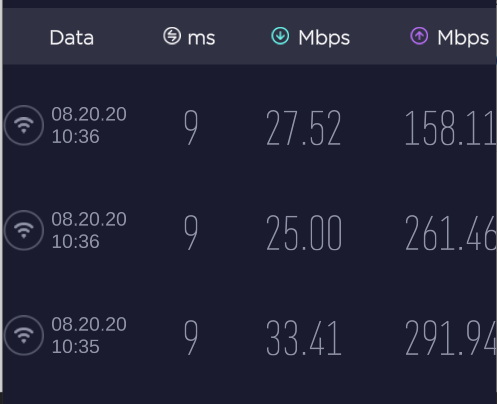
After a reset, I`ve disabled the windows firewall and my speed with a wired connection got up to 850mbps.

But my WiFi did not went more than 50mbps. I`ve also tried differents 2.4/5Ghz channels.


Brian
Odido
  • Oud-Moderator
  • August 21, 2020

Hi @juangp3 Good to see that you managed to get up to the speed with the firewall disabled. What type of modem are you using? The Draytek, Huawei or Zyxel? Then we’ll see what we can do about the Wifi!


  • is een Top Poster
  • August 21, 2020

I’m using Zyxel


Jason van Odido
Moderator
Forum|alt.badge.img+17

Good morning @juangp3, Wifi is very important, we can hardly live without it. I really want it to work absolutely perfect at your home-connection as well!

I've thoroughly analyzed your connection and it appears to be very stable, so that's a good thing. I also notice you currently have five different devices connected to the Wifi, could you try and disconnect every single one and then reconnect them in order to check if that helps up the speed, please? Thanks in advance, I'm sure we'll find a solution speed-wise!

The strength of the Wifi depends on a couple of things. For example: the distance to the modem, a barrier (walls) or a neighboring Wifi-network. We can't adjust everything, but we can optimize it! On our Community are some tools that improve the range and stability of your Wifi. Look here for the explanation: Haal het maximale uit jouw Wifi. Adjusting the Wifi channel in particular is usually the solution. We recommend the use of the automatic channel. Good luck with the tips and if there's anything I can help you with, please feel free to ask for help! 😄


  • is een Top Poster
  • August 26, 2020

Good morning @juangp3, Wifi is very important, we can hardly live without it. I really want it to work absolutely perfect at your home-connection as well!

I've thoroughly analyzed your connection and it appears to be very stable, so that's a good thing. I also notice you currently have five different devices connected to the Wifi, could you try and disconnect every single one and then reconnect them in order to check if that helps up the speed, please? Thanks in advance, I'm sure we'll find a solution speed-wise!

The strength of the Wifi depends on a couple of things. For example: the distance to the modem, a barrier (walls) or a neighboring Wifi-network. We can't adjust everything, but we can optimize it! On our Community are some tools that improve the range and stability of your Wifi. Look here for the explanation: Haal het maximale uit jouw Wifi. Adjusting the Wifi channel in particular is usually the solution. We recommend the use of the automatic channel. Good luck with the tips and if there's anything I can help you with, please feel free to ask for help! 😄


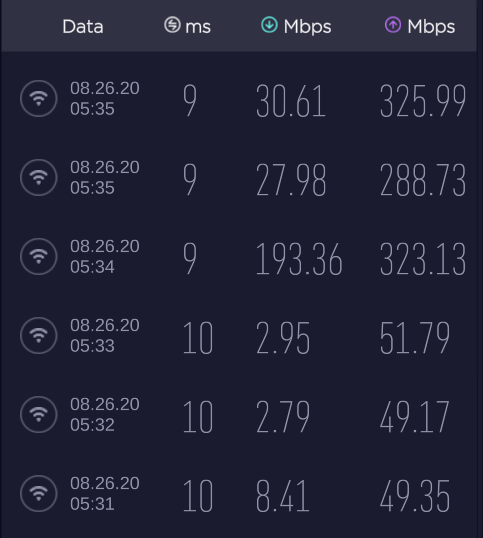
Today I could spend some time to change the modem channels again and connect one device at time.

I still have not an acceptable WiFI speed regarding my subscription.


  • is een Top Poster
  • August 26, 2020

@Jason, also, my devices are at most, 3m far from the modem, with no walls blocking the signal.


  • August 26, 2020

@juangp3 

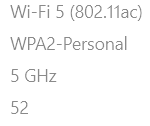
Do all or multiple of your devices getting these speeds results or just one? Also are you connected to the 2.4Ghz or 5Ghz Wifi?


  • is een Top Poster
  • August 29, 2020

My phone is connected to 5Ghz wifi and is measuring +/- 50Mbps.
My PC also to a 5Ghz and mesuring not much than 30Mbps.


  • August 29, 2020

Hier ook een zeer slechte internet verbinding

Besteld 1000mbit verbinding

Afgelopen woensdag aangesloten.  Download nog geen150mbit upload niet hoger dan 65mbit


Had hiervoor een 500mbit KPN verbinding

Top verbinding 560 download 585 upload

Om het een en andere uit te sluiten even mijn eigen fritzbox er tussen gezet.  Ook deze geen dezelfde belabberde down en upload 


Probleem zit zeker niet binnenshuis.

Maandag komt de monteur van Guidion weer.

Ben benieuwd waar hij mee komt


  • is een Top Poster
  • August 30, 2020

@DMM0202 you are luckier than me.
I’m trying already for 12days and I’ve call support, sent an email to klanteservice@t-mobilethuis.nl as I was told… tried whatever “tips” I got here and I’m only able to use 5% of what I’m paying.


Brian
Odido
  • Oud-Moderator
  • August 31, 2020

Hi @juangp3 I’ve just checked your incoming connection and this looks to be rock solid. So the good news is that the connection itself seems, now we still need to fix the Wifi. I’ve made a change to the modem and turned off the automatic band steering. This means that you now have to select either 2.4 Ghz or 5 Ghz manually but the connection should be more stable. Could you do another Wifi test to see if this is indeed the case?


  • is een Top Poster
  • September 1, 2020

@Brian, In my phone connectec at 5GHz: :small_red_triangle_down: 57,6Mbps.   

Another phone connected at 2.4Ghz:  :small_red_triangle_down: 38,2Mbps

My notebook  connected at 5Ghz:  :small_red_triangle_down: 34,05Mbps


Brian
Odido
  • Oud-Moderator
  • September 2, 2020

Hi @juangp3, thank you for the results. And this is at around 3 meters away from the modem judging from your previous posts? Have you also tried the connection with a network cable? Are you receiving the proper speeds with this wired connection? It’s quite strange that the Wifi speeds vary so wildly. If you want I can send over a mechanic to check it out and see if we can fix it! 


  • is een Top Poster
  • September 4, 2020

@Brian, yes..less than 3m.

With cable, I can get up to 850.

I would like to receive a support as you mentioned.


Thanks