Beantwoord

How can I configure a DMZ on Zyxel T54 (DX5401-B1)


Pierre Quemard

Hi Everyone,


I am running a server behind my router.

I used to be able to configure a DMZ but I don’t see the option on the Tyxel.

Is there any way to set up the equivalent ? I am running HTTPS / DNS / SMTP / POP3 and IMAPS

Thanks for your help !

 

Beste antwoord door Pierre Quemard

I am redirecting to my dnsname with HTTPS using caddy → http://HOSTNAME → https://HOSTNAME
My main problem is that from my home network when I open https://MYEXTERNALIP it open the router interface, it should be opening the DMZ.

Are you still working with DMZ? Then I don't know. 

When using poort forwarding (not DMZ) it works for me. 


I will switch to port forwarding then. Thanks a lot for your help !

Bekijk origineel

13 reacties

rvk01
  • October 16, 2025

It’s under the Three lines (above right) > Netwerkinstellingen > NAT > DMZ.

Do note that ALL incoming traffic will be also redirected to the DMZ. Your server might be unsecure. You can also just forward the ports which are needed only for the services you run.

That’s under Three lines (above right) > Netwerkinstellingen > NAT > Poortdoorschakeling

That’s much saver then throwing a server in the DMZ.


Pierre Quemard

Thanks a lot for the answer !
I am aware on the security aspect.
I am using “ufw” plus some post script on iptables for my docker containers.
Monitoring access with Datadog.


Cheers,


Waqqas
Super User
Forum|alt.badge.img+15
  • Odido Superuser
  • October 16, 2025

Hello ​@Pierre Quemard 

It's also better to give the device for which the ports are being opened a static IP address so it will not change.

You can do so under netwerkinstellingen > thuisnetwerk > statische DHCP.


Pierre Quemard

Thanks ​@Waqqas already set that up based on MAC Address.


Pierre Quemard

Interestingly when I redirect to my external IP port 80 and 443 are connecting directly to the Router UI.

Do you know what should be done to get those port to go to my server instead of the router ?

Every other port like SMTP SSH POP3 IMAPS are working fine.


rvk01
  • October 20, 2025

Are you sure the ports are redirected to a valid internal IP (other than that of the router)?

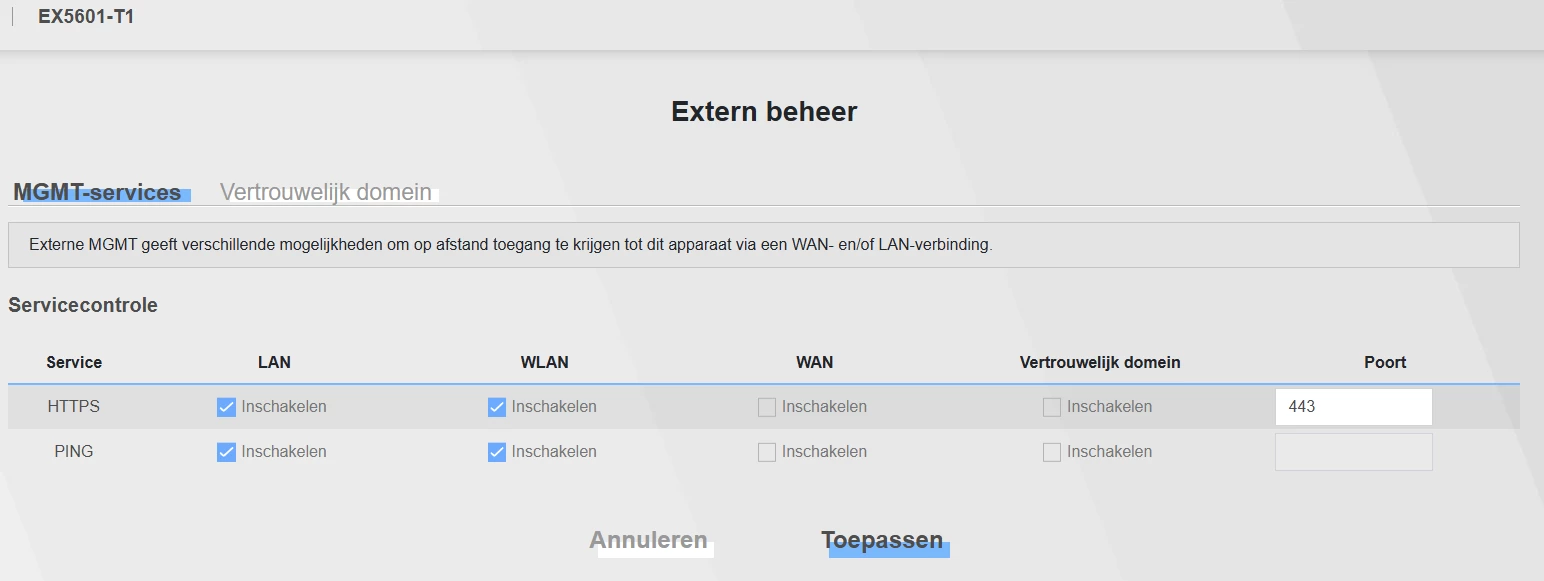
Make sure HTTP and HTTPS is off for the WAN and “Vertrouwelijk domein” interface in “Onderhoud > Extern beheer”.


Pierre Quemard

I figured it out. It’s only when I am home that the external IP redirect to the router, when I am outside of my home network I can access the server HTTP and HTTPS properly.
For some reason both 192.168.1.1 and <EXTERNAL_IP> resolve to the router admin page in HTTP and HTTPS.


rvk01
  • October 20, 2025

I figured it out. It’s only when I am home that the external IP redirect to the router, when I am outside of my home network I can access the server HTTP and HTTPS properly.
For some reason both 192.168.1.1 and <EXTERNAL_IP> resolve to the router admin page in HTTP and HTTPS.

That shouldn’t happen. At least for my T-56 it doesn’t.

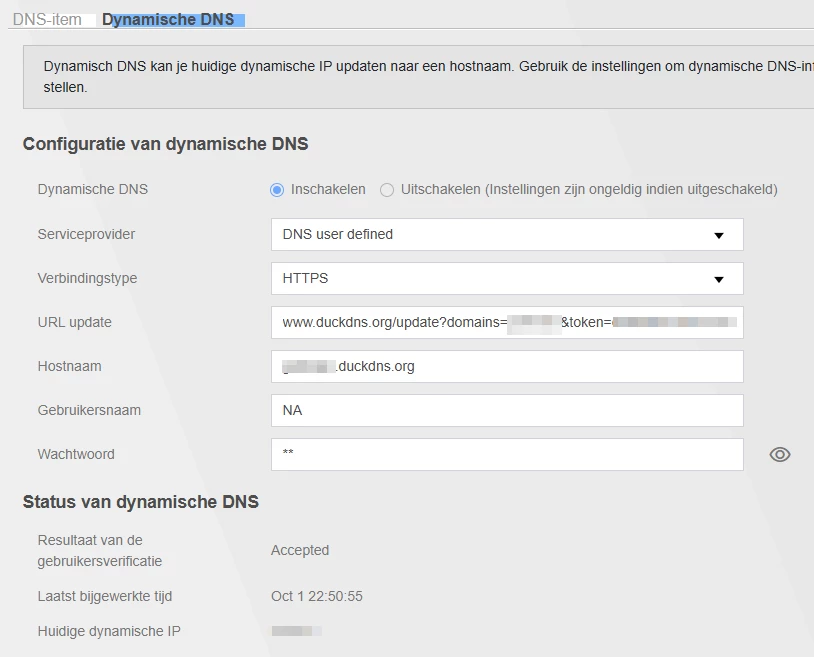
But normally I use my DDNS hostname (automatically updated by the DDNS setting in the router). Easier to remember than a (sometimes changing) IP adres.

Further… HTTP (port 80) shouldn’t even be available for remote control of the router GUI. In the T-56 it’s not even there.

Are you sure the WAN is not checked on this page?


Pierre Quemard

Thanks a lot ​@rvk01

Correct for HTTP not expose but my server reroute all 80 traffic 443 that’s why they both sent to the router homepage.

WAN is not checked, I will investigate further.

For dynamic DNS do you run something on your server that register entries to your DNS ?


rvk01
  • October 23, 2025

Correct for HTTP not expose but my server reroute all 80 traffic 443 that’s why they both sent to the router homepage.


Wait… your server redirects 80 to 443? If it redirects 80 to the external hostname/ip then yes, it can end up at the router again (seeing from your internal client). It really depends on how you are redirecting it and what the client is “retrieving” after that redirect.

For dynamic DNS do you run something on your server that register entries to your DNS ?

There is a DDNS client in your router itself (under Netwerkinstellingen/DNS/Dynamic DNS). You can use settings there with a free DDNS provider. I use duckdns.org because that’s the only one where you don’t have to confirm your account every few months. So my hostname becomes myname.duckdns.org. See settings below.

BTW. My server throws every http request which comes directly on my IP to a blocklist (via iptables). Only requests via my myname.duckdns.org will be allowed in my server setup.


Pierre Quemard

I am redirecting to my dnsname with HTTPS using caddy → http://HOSTNAME → https://HOSTNAME
My main problem is that from my home network when I open https://MYEXTERNALIP it open the router interface, it should be opening the DMZ.


rvk01
  • October 23, 2025

I am redirecting to my dnsname with HTTPS using caddy → http://HOSTNAME → https://HOSTNAME
My main problem is that from my home network when I open https://MYEXTERNALIP it open the router interface, it should be opening the DMZ.

Are you still working with DMZ? Then I don't know. 

When using poort forwarding (not DMZ) it works for me. 


Pierre Quemard

I am redirecting to my dnsname with HTTPS using caddy → http://HOSTNAME → https://HOSTNAME
My main problem is that from my home network when I open https://MYEXTERNALIP it open the router interface, it should be opening the DMZ.

Are you still working with DMZ? Then I don't know. 

When using poort forwarding (not DMZ) it works for me. 


I will switch to port forwarding then. Thanks a lot for your help !