Internet speed is very slow than the subscribed speed


Aditya P

Hi There,

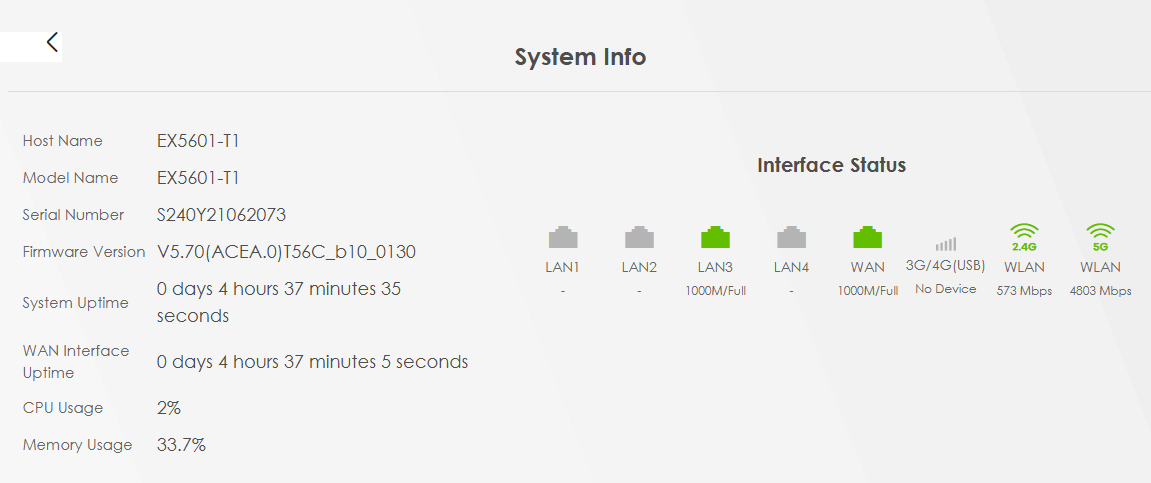
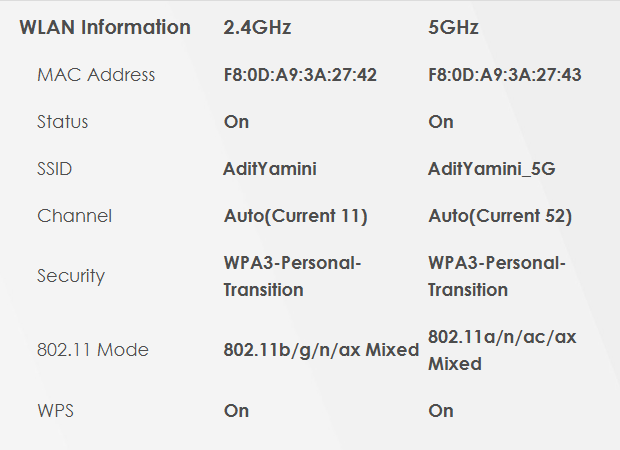
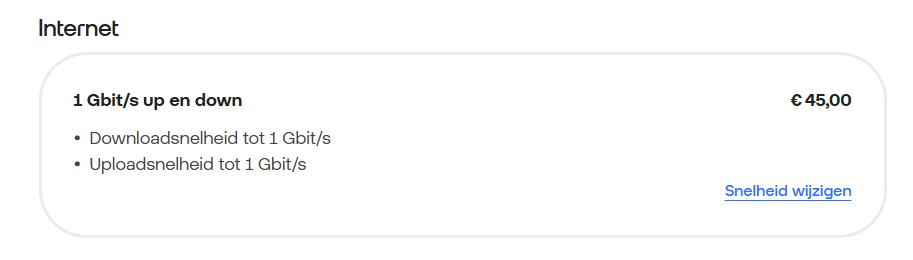
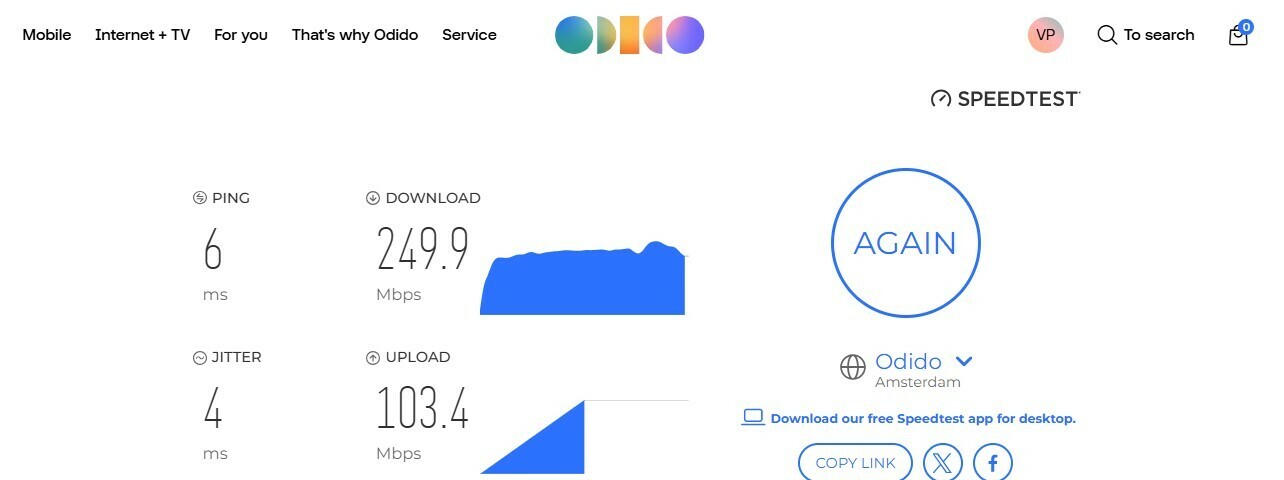
I have a 1 Gbit/s up en down subscription, but when I do a speed test all I get is 250 Mbps Download speed and 104 Mbps upload speed, which is not even half of the subscribed speed. For background, I live in a apartment and use ZYXEL T-56 (firmware : V5.70(ACEA.0)T56C_b10_0130). It was fine all these days and from couple of days I see sudden drop down in the internet speed and the streaming content started buffering. I was having 400Mbps subscription in the beginning and yesterday I upgraded my plan to 1Gbps, even the issue is same. Below I attached the snap of speedtest captured around 17:15 CET on 8th May 2025. Can someone from Odido look into the issue and fix ASAP?


May 10, 2025

You can also log in on to router, go to the menu, netwerkinstellingen, draadloos, kanaalstatus, select 5 GHz en click on scan.

True. But that will only show the AP count on those channels. Not the actual strength of each AP. It’s not a problem to choose a channel where there are 4 other AP’s with much much less strength (you will just push those away). You want to avoid the channels where there are other string AP’s (i.e. the Neighbors).

BTW. The Auto-scan should pick the best channel for that moment.

I think if you want more speed, you might be better off choosing a wider band (40 or 80Mhz). But ultimately… a meter-cupboard is never a good place to place a router. Place it just outside, high against the wall besides the cupboard. (You can begin testing this by opening the door of the cupboard wide open)

  • (2) Het Auto-kanaal-selectiealgoritme komt niet altijd overeen met de AP-telling. Er wordt ook rekening gehouden met andere factoren op de kanalen.


Thanks for you response ​@rvk01. Yes keeping the modem outside cast is definitely having good effect, but unfortunately I am in a rented place and I dont have any other spot to place the modem and am not allowed to put nails in the wall. So for now it has to be in the meter cast (may be I will keep it outside when I have my own house😂. 

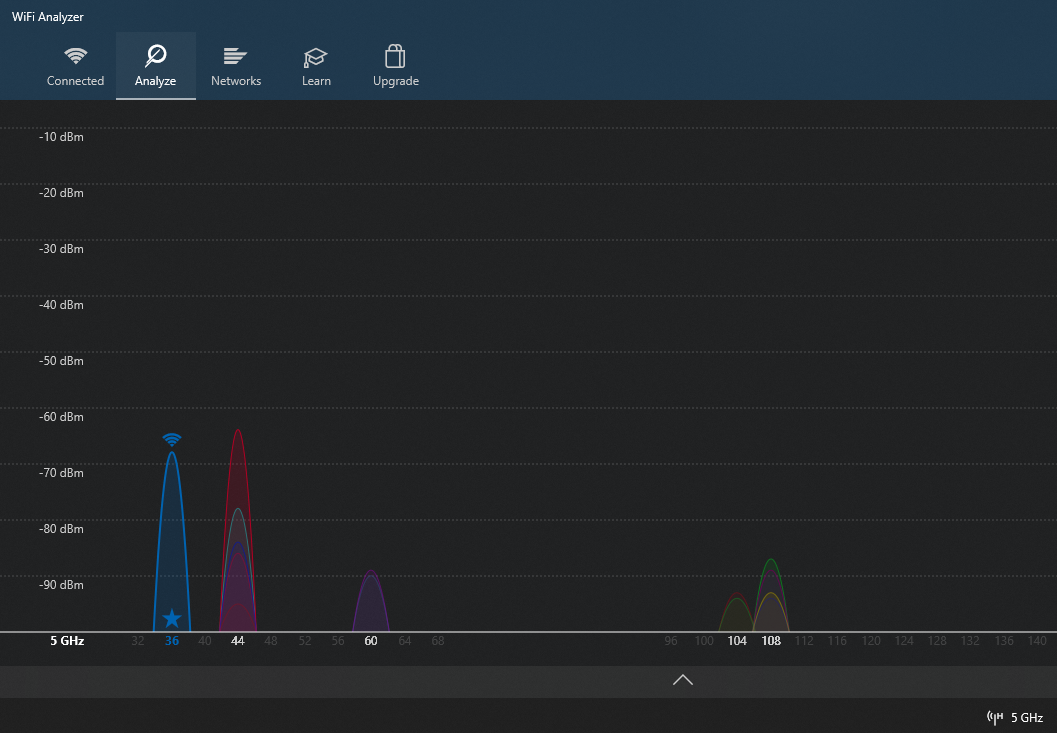
But for now I installed WiFi Analyzer in my Windows laptop and it showed the better channel as 36 (with a star mark, I believe its indication for better channel strength). 


22 reacties

eric
Super User
Forum|alt.badge.img+14
  • Odido Superuser
  • May 8, 2025

Did you connect the computer with a cable directly to the router?


Aditya P
  • Auteur
  • is een Top Poster
  • May 8, 2025

Did you connect the computer with a cable directly to the router?

Yes I did tried that, I dont see any improvements either. I also disconnected my router from power, waited 5 minutes then connected to power again (couple of times), but no use


Waqqas
Super User
Forum|alt.badge.img+15
  • Odido Superuser
  • May 8, 2025

Hello ​@Aditya P 

Can you do the test with a laptop directly connected to the router with a wired connection using the Ookla speedtest app?

What you could also try is replace the cable between router and laptop, replace the cable between mediaconverter and router and restart the mediaconverter.

Share a printscreen of the result so Odido can investigate this if needed.


Aditya P
  • Auteur
  • is een Top Poster
  • May 8, 2025

Hello ​@Aditya P 

Can you do the test with a laptop directly connected to the router with a wired connection using the Ookla speedtest app?

What you could also try is replace the cable between router and laptop, replace the cable between mediaconverter and router and restart the mediaconverter.

Share a printscreen of the result so Odido can investigate this if needed.

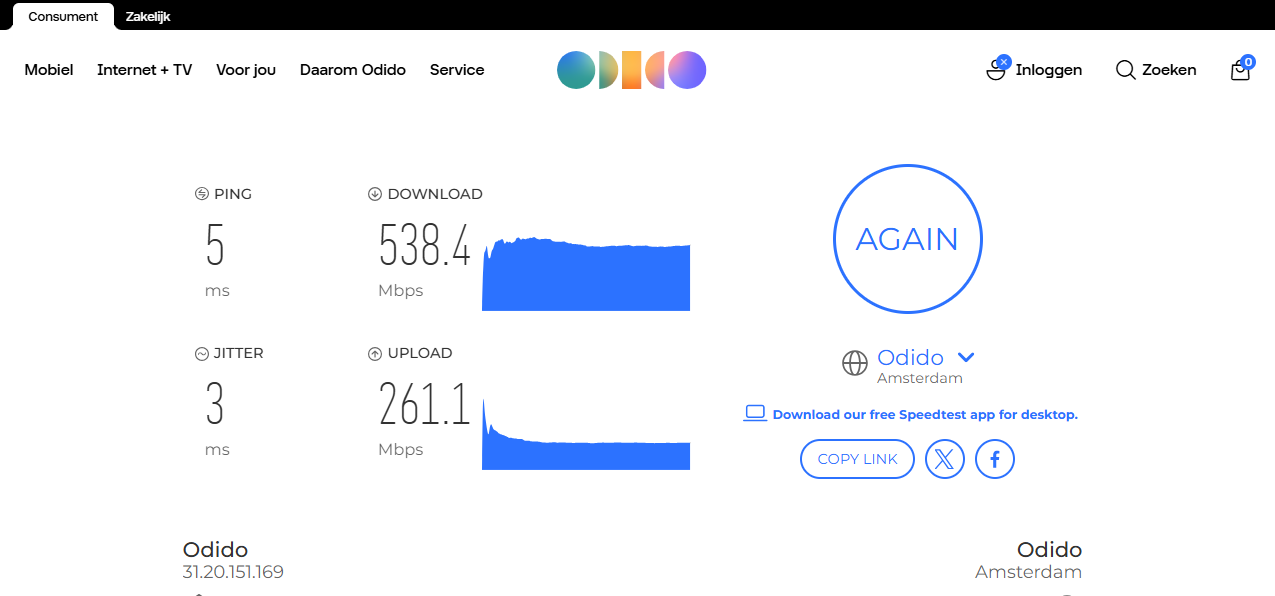
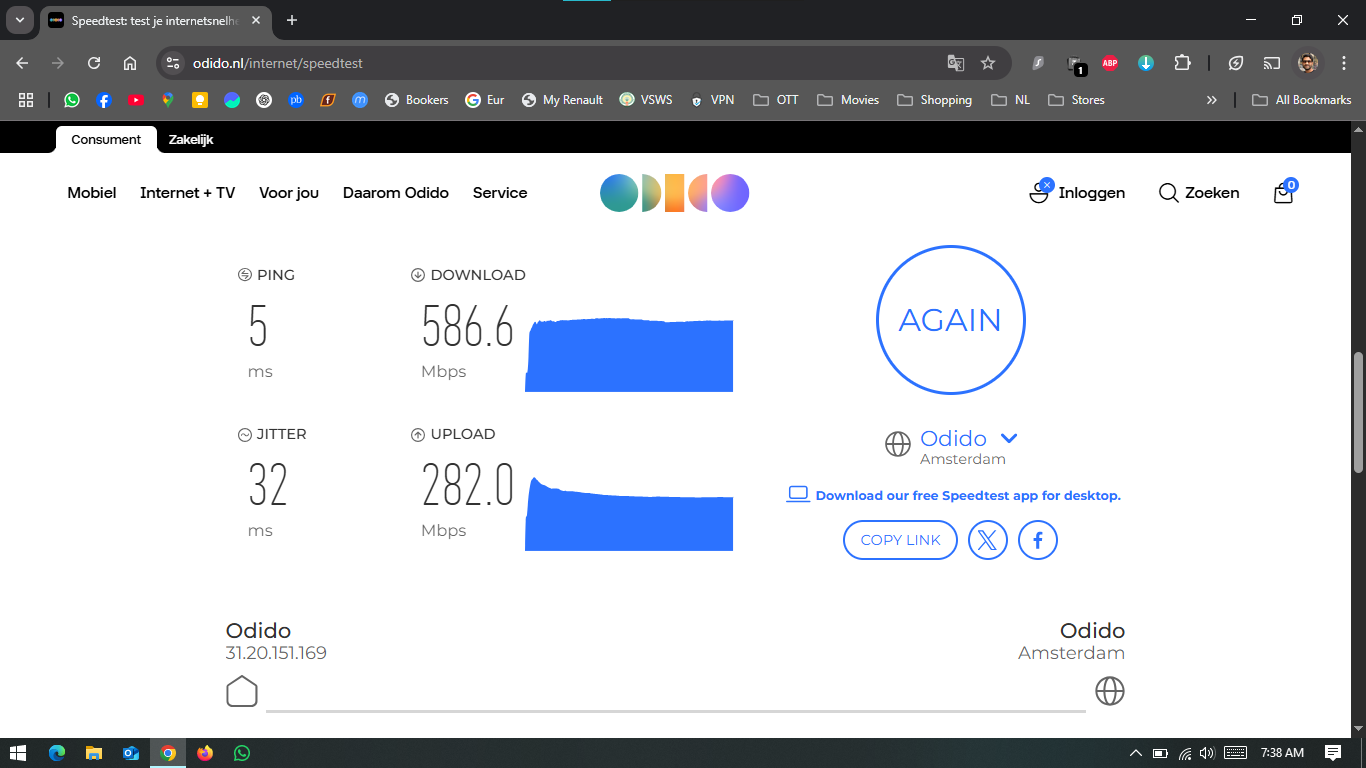
Hey ​@Waqqas, Thanks for responding, below is the Odido speedtest result while my laptop connected to router via LAN cable


Waqqas
Super User
Forum|alt.badge.img+15
  • Odido Superuser
  • May 8, 2025

​@Aditya P 

Follow the instructions exactly as described here, share the printscreens here.

handleiding


Aditya P
  • Auteur
  • is een Top Poster
  • May 9, 2025

​@Aditya P 

Follow the instructions exactly as described here, share the printscreens here.

handleiding

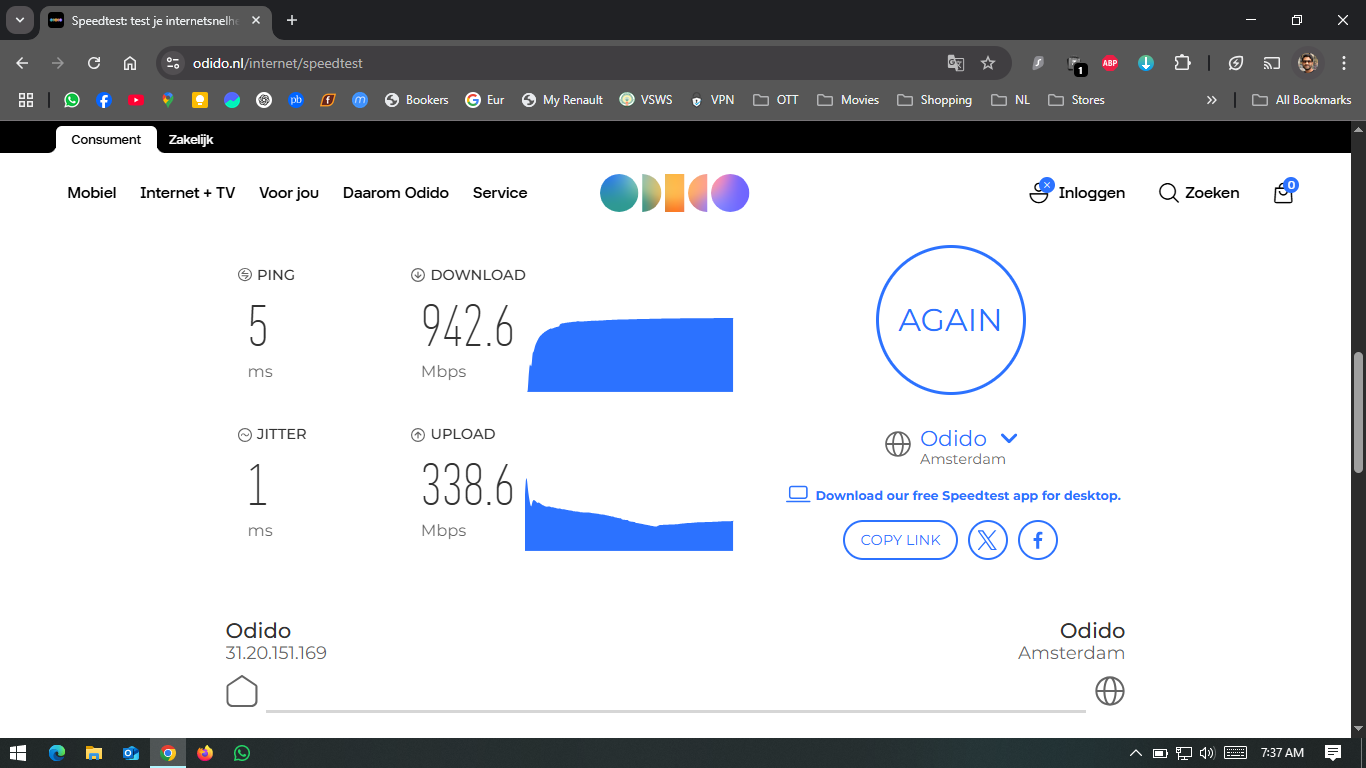
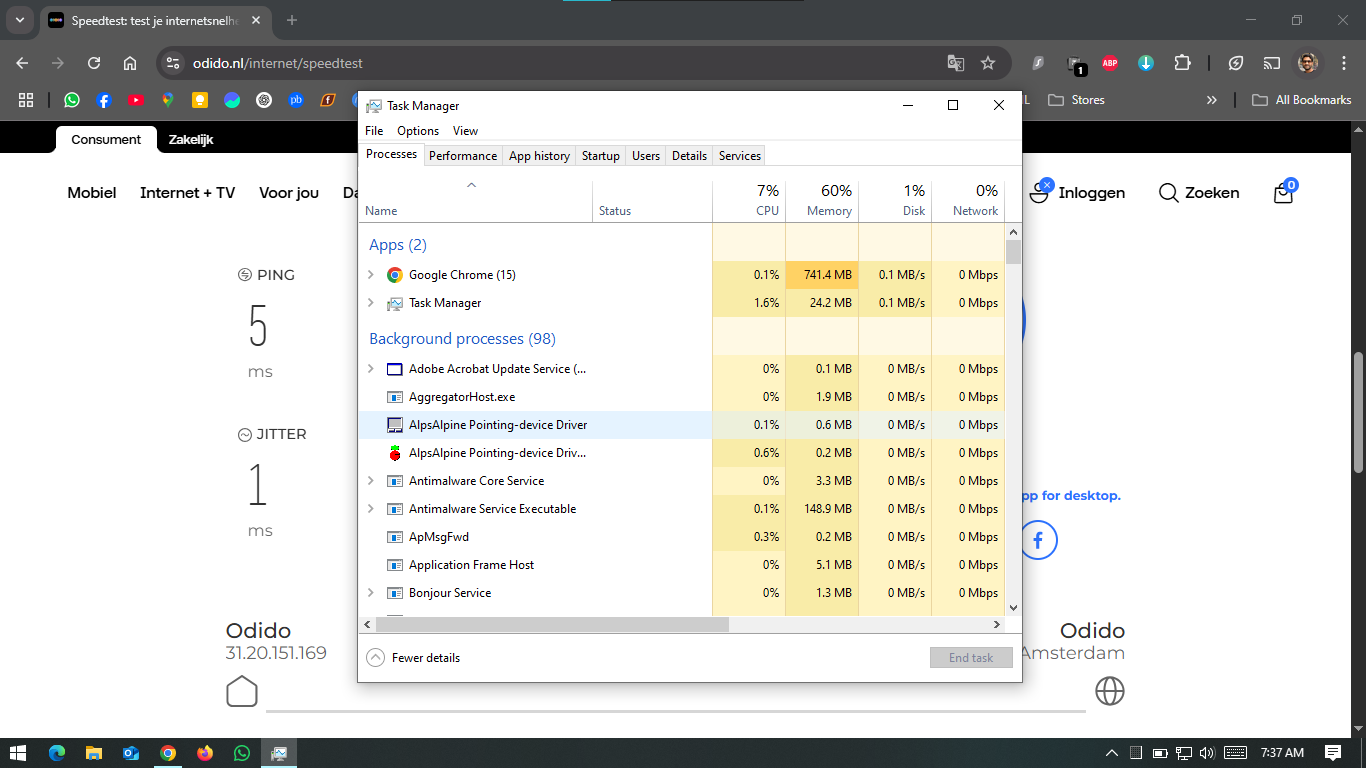
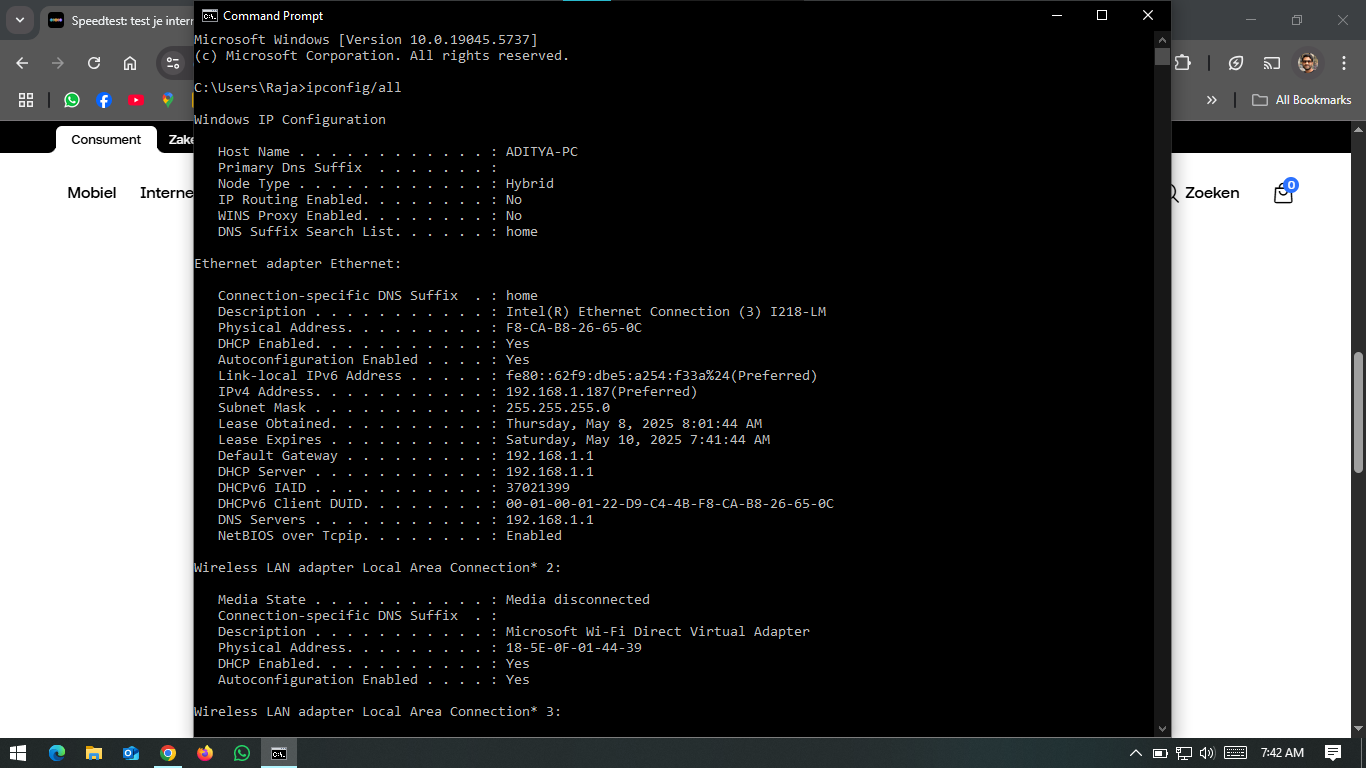
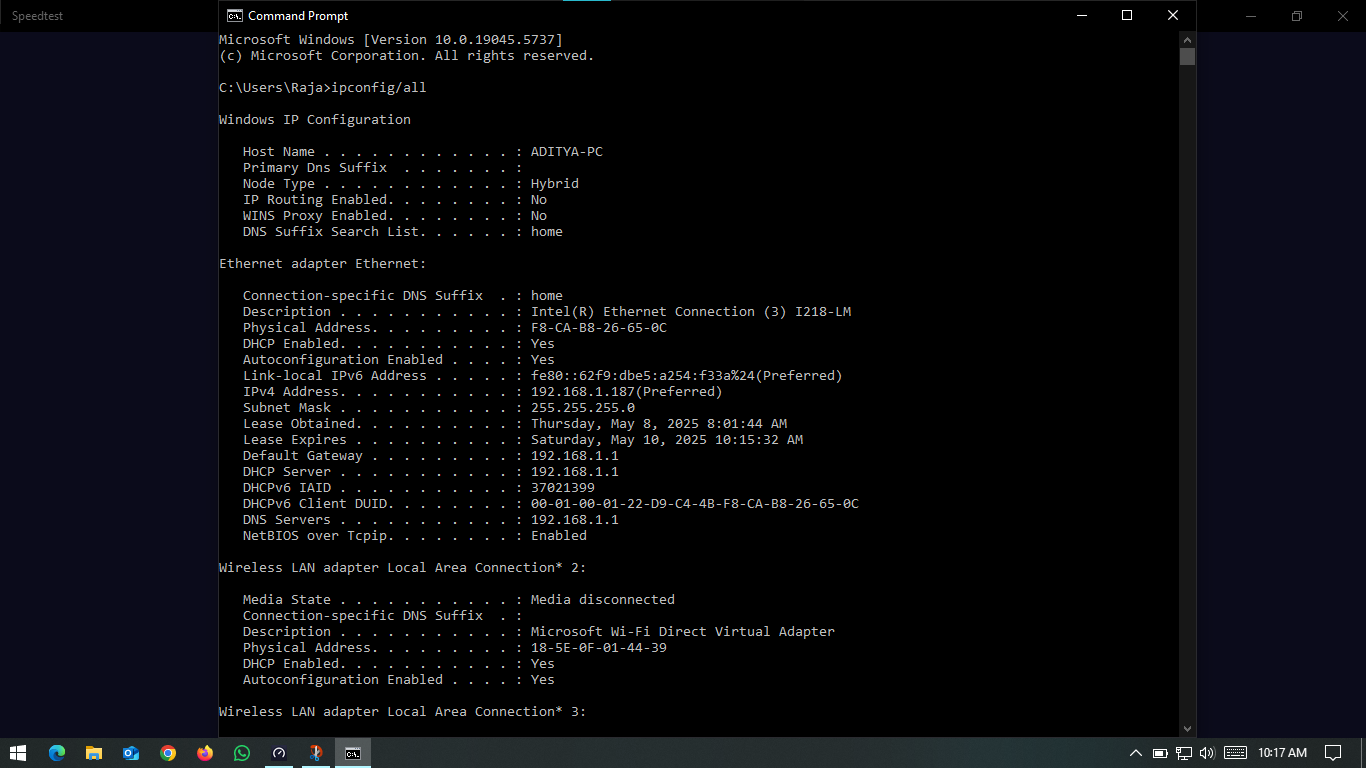
Hey ​@Waqqas, Below are the screenshots of the steps

This this while LAN cable connected:


This is the speed test on WiFi 5Ghz channel while standing next to the router


Waqqas
Super User
Forum|alt.badge.img+15
  • Odido Superuser
  • May 9, 2025

​@Aditya P 

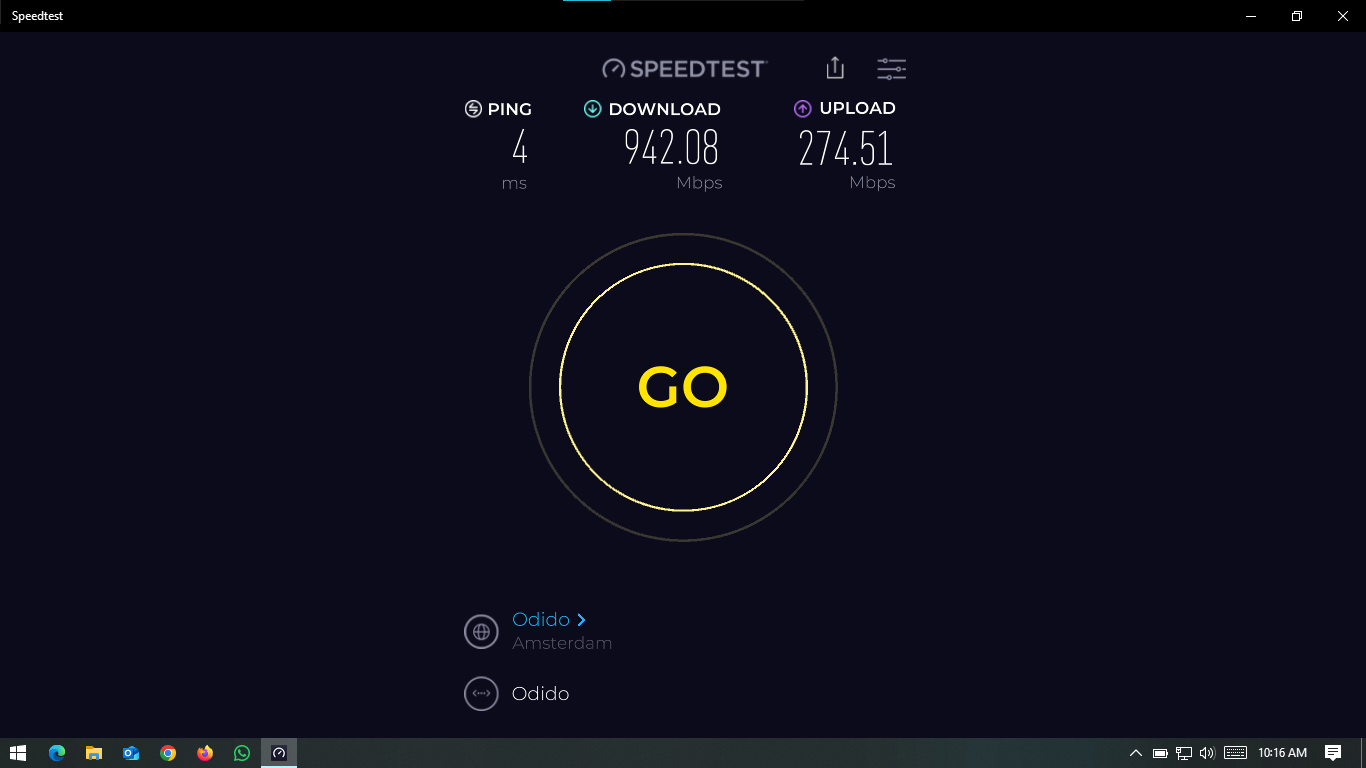
Please go to speedtest.net, dównload the app and perform anspeedtest via that app.


Aditya P
  • Auteur
  • is een Top Poster
  • May 9, 2025

​@Aditya P 

Please go to speedtest.net, dównload the app and perform anspeedtest via that app.


Waqqas
Super User
Forum|alt.badge.img+15
  • Odido Superuser
  • May 9, 2025

​@Aditya P 

The download is ok and have you tried the following?

What you could also try is replace the cable between router and laptop, replace the cable between mediaconverter and router and restart the mediaconverter.


Aditya P
  • Auteur
  • is een Top Poster
  • May 9, 2025

​@Aditya P 

The download is ok and have you tried the following?

What you could also try is replace the cable between router and laptop, replace the cable between mediaconverter and router and restart the mediaconverter.

Yes I did, tried with different cables. My problem is not with wired connection but with wireless connection. I hardly connect any device to wired network at home. Wireless speed of wifi is 500Mbs if I am standing next to modem and it drops to 300 Mbps if I move 3 meters away from modem.


Waqqas
Super User
Forum|alt.badge.img+15
  • Odido Superuser
  • May 9, 2025

​@Aditya P 

For WiFi you can look at which channel is the most suitable using a WiFi analyser, you can also change the frequenrie of the router interface.

Is your router located in the cupboard or in the livingroom for example?


Aditya P
  • Auteur
  • is een Top Poster
  • May 9, 2025

​@Aditya P 

For WiFi you can look at which channel is the most suitable using a WiFi analyser, you can also change the frequenrie of the router interface.

Is your router located in the cupboard or in the livingroom for example?

Its located in the Meter cast at the entrance door. I am already using 2.4Ghz and 5Ghz channels. Do you mean something else?


Waqqas
Super User
Forum|alt.badge.img+15
  • Odido Superuser
  • May 9, 2025

​@Aditya P 

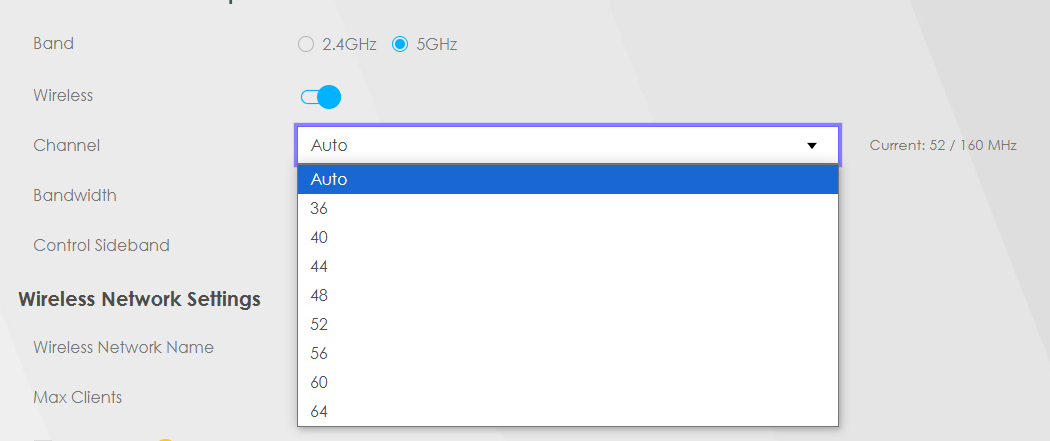
After you log in to the web interface, go to the menu, netwerkinstellingen, draadloos, algemeen, select 5 GHz and there you can try to use a fixed channel.


Aditya P
  • Auteur
  • is een Top Poster
  • May 9, 2025

​@Aditya P 

After you log in to the web interface, go to the menu, netwerkinstellingen, draadloos, algemeen, select 5 GHz and there you can try to use a fixed channel.

I have this list of channels, so what you are suggesting is to set a single channel (ex: 48)? Does that improve the wifi speed?


Waqqas
Super User
Forum|alt.badge.img+15
  • Odido Superuser
  • May 9, 2025

​@Aditya P 

Maybe, install a WiFi analyser app on your phone and check which channel is not being used by neighbours.


Aditya P
  • Auteur
  • is een Top Poster
  • May 9, 2025

​@Aditya P 

Maybe, install a WiFi analyser app on your phone and check which channel is not being used by neighbours.

There are may analyser apps, I am not sure which can help. Do you have any recommendations?


Waqqas
Super User
Forum|alt.badge.img+15
  • Odido Superuser
  • May 9, 2025

​@Aditya P 

I don't know if you have android or IOS but you can download any WiFi analyser app, they all do the same and that is to show you which channel is busy and which not.


Aditya P
  • Auteur
  • is een Top Poster
  • May 9, 2025

​@Aditya P 

I don't know if you have android or IOS but you can download any WiFi analyser app, they all do the same and that is to show you which channel is busy and which not.

I have a iPhone. I did tried couple of apps, but none of them showed details about traffic on channels. Or may be I am too dumb to understand. Can you share a screenshot from any app showing channel traffic if you have it handy?


rvk01
  • May 9, 2025

​@Aditya P I don’t think Apple allows wifi scanner on iOS (yes, blame Apple for that).

But you said you also have a laptop. Is that a Windows laptop? You can use a wifi analyzer on that one. https://apps.microsoft.com/detail/9nblggh33n0n


Waqqas
Super User
Forum|alt.badge.img+15
  • Odido Superuser
  • May 9, 2025

​@Aditya P 

You can also log in on to router, go to the menu, netwerkinstellingen, draadloos, kanaalstatus, select 5 GHz en click on scan.


rvk01
  • May 9, 2025

You can also log in on to router, go to the menu, netwerkinstellingen, draadloos, kanaalstatus, select 5 GHz en click on scan.

True. But that will only show the AP count on those channels. Not the actual strength of each AP. It’s not a problem to choose a channel where there are 4 other AP’s with much much less strength (you will just push those away). You want to avoid the channels where there are other string AP’s (i.e. the Neighbors).

BTW. The Auto-scan should pick the best channel for that moment.

I think if you want more speed, you might be better off choosing a wider band (40 or 80Mhz). But ultimately… a meter-cupboard is never a good place to place a router. Place it just outside, high against the wall besides the cupboard. (You can begin testing this by opening the door of the cupboard wide open)

  • (2) Het Auto-kanaal-selectiealgoritme komt niet altijd overeen met de AP-telling. Er wordt ook rekening gehouden met andere factoren op de kanalen.

Aditya P
  • Auteur
  • is een Top Poster
  • May 10, 2025

You can also log in on to router, go to the menu, netwerkinstellingen, draadloos, kanaalstatus, select 5 GHz en click on scan.

True. But that will only show the AP count on those channels. Not the actual strength of each AP. It’s not a problem to choose a channel where there are 4 other AP’s with much much less strength (you will just push those away). You want to avoid the channels where there are other string AP’s (i.e. the Neighbors).

BTW. The Auto-scan should pick the best channel for that moment.

I think if you want more speed, you might be better off choosing a wider band (40 or 80Mhz). But ultimately… a meter-cupboard is never a good place to place a router. Place it just outside, high against the wall besides the cupboard. (You can begin testing this by opening the door of the cupboard wide open)

  • (2) Het Auto-kanaal-selectiealgoritme komt niet altijd overeen met de AP-telling. Er wordt ook rekening gehouden met andere factoren op de kanalen.


Thanks for you response ​@rvk01. Yes keeping the modem outside cast is definitely having good effect, but unfortunately I am in a rented place and I dont have any other spot to place the modem and am not allowed to put nails in the wall. So for now it has to be in the meter cast (may be I will keep it outside when I have my own house😂. 

But for now I installed WiFi Analyzer in my Windows laptop and it showed the better channel as 36 (with a star mark, I believe its indication for better channel strength).