Beantwoord

High Jitter and Packet Loss

  • September 16, 2025
  • 4 reacties
  • 146 Bekeken

  • heeft eerste post geplaatst

Hi I have one of your 1GB modems installed and experience a lot of packet loss and jitter when playing Online games (Valorant). This has been an ongoing issue since I’ve had it installed. I usually happens in late afternoon/evening and makes playing online games impossible. I play using wifi on my ps5. Unfortunately using a wired connection is not possible since I would have to run the cable across my stairway which is not practical. Unfortunately using a wired connection is not possible since I would have to run the cable across my stairway which is not practical. Additionally this happens even when there’s no other device connected to my wifi.  I would like to have this fix. The only reason I order your 1Gb modem was to play online and I can’t even do that.

I hope to hear from you soon

Beste antwoord door Waqqas

Hello ​@dlima 

Do you have this problem only while gaming on the PlayStation and during the day all works fine?

Are you only using the router WiFi or do you also have an extender?

Bekijk origineel

4 reacties

Waqqas
Super User
Forum|alt.badge.img+15
  • Odido Superuser
  • Antwoord
  • September 16, 2025

Hello ​@dlima 

Do you have this problem only while gaming on the PlayStation and during the day all works fine?

Are you only using the router WiFi or do you also have an extender?


  • Auteur
  • heeft eerste post geplaatst
  • September 16, 2025

Hello ​@dlima 

Do you have this problem only while gaming on the PlayStation and during the day all works fine?

Are you only using the router WiFi or do you also have an extender?

I just use Wifi.

It also happens during the day sometimes but it is much less frequent and not as intense. During the afternoon/evening it always happens and playing is almost impossible.


Waqqas
Super User
Forum|alt.badge.img+15
  • Odido Superuser
  • September 16, 2025

​@dlima 

What you could try:

Change the cable between router and ONT.

Select a fixed WiFi channel for your WiFi (use a WiFi analyzer app to see which channel is best).

Perform a factory reset of the router.

Do you fave problems in other devices aswell because of the latency?


  • Auteur
  • heeft eerste post geplaatst
  • September 18, 2025

​@dlima 

What you could try:

Change the cable between router and ONT.

Select a fixed WiFi channel for your WiFi (use a WiFi analyzer app to see which channel is best).

Perform a factory reset of the router.

Do you fave problems in other devices aswell because of the latency?

 Hi,

I did a factory reset, even turned of easy mesh to separate the bands.

I further changed the channel on 5G to the best (after using a wifi analyser).

I didn’t switch the cable since it runs through the wall, but the tests below confirm this is not the problem.

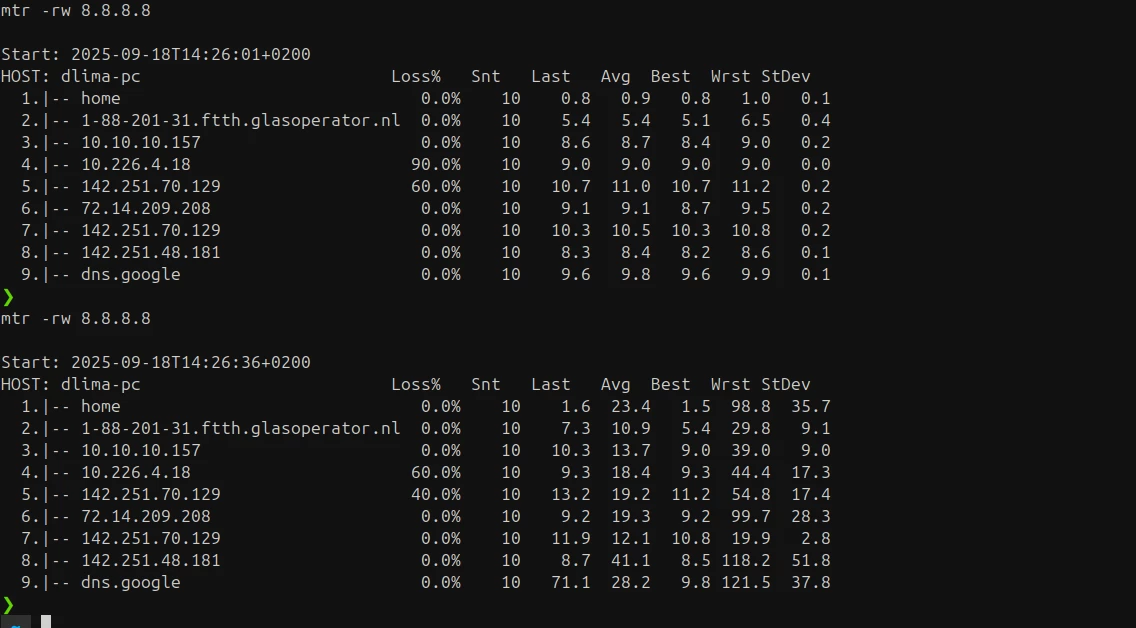
I ran the following command while standing right next to the router (so no physical interference).

The test at the top is using a LAN connection and the bottom one using wifi (5G)

 I further ran the following ping tests:

(ON WIFI)

ping -c 50 8.8.8.8

--- 8.8.8.8 ping statistics ---
50 packets transmitted, 50 received, 0% packet loss, time 49061ms
rtt min/avg/max/mdev = 10.024/22.156/106.442/22.395 ms
 

(ON LAN)

ping -c 50 8.8.8.8
--- 8.8.8.8 ping statistics ---
50 packets transmitted, 50 received, 0% packet loss, time 49076ms
rtt min/avg/max/mdev = 9.576/9.761/10.074/0.125 ms


Based on these tests, the fiber line itself is stable (LAN latency ~9 ms, jitter <0.2 ms). However, the supplied router ZYXEL (EX5601-T1) shows significant instability on Wi-Fi, even when standing next to the device on the 5 GHz band (latency fluctuating between 10–106 ms, jitter ~22 ms). This suggests the issue lies with the router’s Wi-Fi performance rather than the ISP connection.