Vraag

Android Odido TV app (nl.tmobiletv.vinson) crasht bij opstarten op GrapheneOS 2026062300

  • June 26, 2026
  • 9 reacties
  • 104 Bekeken

Hoi,

Sinds de update naar GrapheneOS 2026062300 crasht de Odido TV app (nl.tmobiletv.vinson) direct bij het opstarten.

Details:
  • Build: GrapheneOS  2026062300
  • Casting werkt wél (na Private DNS uit + Nearby devices rechten)
  • Geen VPN
  • Private DNS uit
  • App volledig verwijderd + opnieuw geïnstalleerd + alle rechten gegeven (Nearby devices + Netwerk)
  • Crasht nog steeds direct
Crash log (samenvatting):
  • Native SIGSEGV op pc 0000000000000000 (Instruction Abort)
  • Zeer vroege crash (process uptime ~3s)
  • Achtergrond threads proberen FirebaseMessaging.blockingGetToken en SyncTask uit te voeren

Crash log (tombstone) is hieronder geplakt.
 

=======================================

=== Crash Log - Odido TV (nl.tmobiletv.vinson) ===
Build: 2026062300
Device: google/bluejay/bluejay (Pixel 6a)
Android: 17 (CP2A.260605.012)
Timestamp: 2026-06-26 21:24:17

Package: nl.tmobiletv.vinson
Process uptime: 3s
Target SDK: 35

=== MAIN CRASH (Thread 4532) ===
signal 11 (SIGSEGV), code -6 (SI_TKILL)
fault addr --------
esr: 0000000082000006 (Instruction Abort Exception)

Backtrace:
#00 pc 0000000000000000  <unknown>

Note: Extremely early native crash.

=== Thread: firebase-instal (tid 4631) ===
Backtrace:
#00 pc syscall+28  libc.so
#01 pc art::Thread::Park  libart.so
#02 pc art::Unsafe_park  libart.so
...
#08 pc com.google.android.gms.tasks.Tasks.await  (base.odex)
#09 pc com.google.firebase.messaging.FirebaseMessaging.blockingGetToken
#10 pc com.google.firebase.messaging.SyncTask.maybeRefreshToken
#11 pc com.google.firebase.messaging.SyncTask.run

=== Thread: firebase-instal (tid 4638) ===
Backtrace:
#00 pc syscall+28  libc.so
#01 pc art::Thread::Park  libart.so
...
#08 pc java.util.concurrent.ThreadPoolExecutor.runWorker
#09 pc com.google.android.gms.common.util.concurrent.zza.run

=== Thread: firebase-instal (tid 4648) ===
Similar Firebase / Tasks / ThreadPool pattern.

=== Thread: MessengerIpcCli (tid 4651) ===
Backtrace shows ScheduledThreadPoolExecutor + Google Tasks.

=== Summary of relevant threads ===
Multiple background threads are attempting to initialize Firebase Cloud Messaging 
and retrieve a Google token (blockingGetToken + SyncTask) right at startup.

The main thread crashes with a native SIGSEGV before the app can properly initialize.



9 reacties

  • Auteur
  • is een nieuwe Poster
  • June 26, 2026

Forum|alt.badge.img+2
  • June 26, 2026

Android: 17 (CP2A.260605.012)

Daar ligt waarschijnlijk het probleem. Doet Odido app überhaupt bij originele Android 17 van Google? Android 17 is eerst 1 week oud, Odido heeft zeker nog niet erop getest.


  • Auteur
  • is een nieuwe Poster
  • June 26, 2026

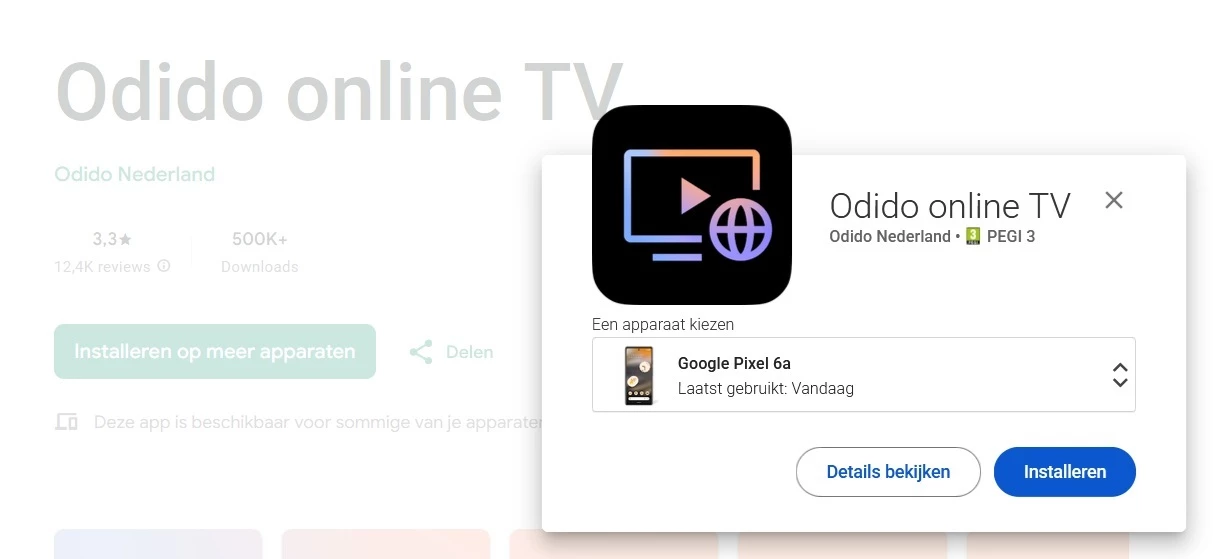
Als ik naar https://play.google.com/store/apps/details?id=nl.tmobiletv.vinson ga, dan is deze volgens Google Play specifiek geschikt voor mijn toestel:


Forum|alt.badge.img+2
  • June 26, 2026

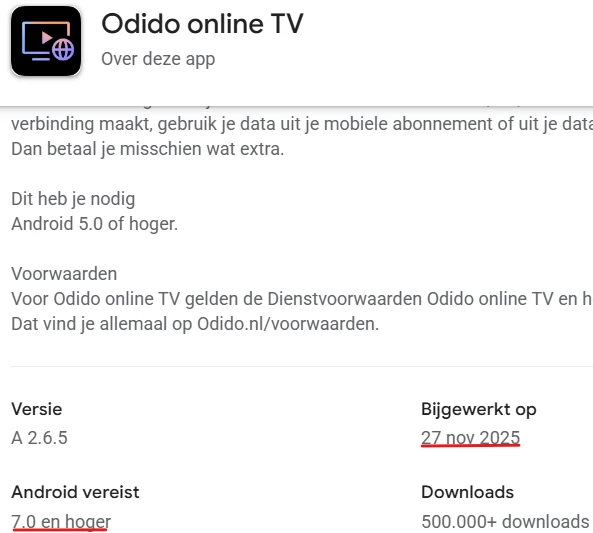
Odido app was voor het laatst in 2025 geüpdatet, toen had men nog geen idee dat Android 17 zal komen


  • Auteur
  • is een nieuwe Poster
  • June 26, 2026

Dat kan, maar dan test Odido hun app dus niet op nieuwe versies van Android.
Ze moeten expliciet opgeven bij Google Play voor welke Android versie de app geschikt is, en dan klopt hun info dus niet.
Daarbij is het slordig dat in de zelfgeschreven tekst “Android 5.0 of hoger” staat, en ze bij het kopje ‘Android vereist’ “7.0 en hoger” hebben ingevuld.


Forum|alt.badge.img+2
  • June 27, 2026

Dat kan, maar dan test Odido hun app dus niet op nieuwe versies van Android.

Hoe kan men in 2025 testen met een Android versie, de in 16 juni 2026 uitgebracht is?

Ze moeten expliciet opgeven bij Google Play voor welke Android versie de app geschikt is, en dan klopt hun info dus niet.

Deze informaties wordt verstrekt bij uitrollen van de actuele versie, dus in 2025

Daarbij is het slordig dat in de zelfgeschreven tekst “Android 5.0 of hoger” staat, en ze bij het kopje ‘Android vereist’ “7.0 en hoger” hebben ingevuld.

Dit betekent alleen dat toen existerende versies hoger dan 7.0 worden getest, dus versie 7.0 t/m 16. Het is ook geen garantie dat een nieuwer uitgebrachte Odido App zal op Android 18.0 werken. Bekijk eens de verandering in Android 17 tegenover 16

Category Type Name
Security Change (all apps) Block cross profile loopback traffic
Cross-profile loopback traffic is no longer permitted by default.
Security Change (all apps) Per-app keystore limits
Apps have a limit on the number of keystore keys they can create, depending on their target API level; creating more keys causes an exception.
Security Change (all apps) Restrict implicit URI grants
If Android apps initiate intents with URIs, we recommend that they explicitly preallocate all necessary URI permissions instead of relying on the system to automatically grant them.
Security Change (apps targeting 17+) Enable CT by default
In Android 16 we allowed apps to opt-in to the Certificate Transparency feature. For Android 17, we are planning to enable Certificate Transparency for all TLS connections performed by the device.
Security Change (apps targeting 17+) Safer Native DCL—C
Apps must ensure DCL modules cannot be overwritten without being detected.
Security Change (apps targeting 17+) Restrict PII fields in CP2 data view
Apps that target Android 17 or higher can't access certain PII fields in the CP2 data view.
Security Change (apps targeting 17+) Enforce strict SQL checks in CP2
For apps targeting Android 17 or higher, Contacts Provider 2 enforces strict SQL query validation when the ContactsContract.Data table is accessed without READ_CONTACTS permission.
Core functionality Change (all apps) App memory limits
Android 17 introduces new app memory limits based on the device's total RAM.
Core functionality Change (all apps) App memory runtime limits
The system will be more rigorous in enforcing app memory limits. Exceeding these limits can cause apps to crash.
Core functionality Change (all apps) usesClearTraffic deprecation plan
We plan to deprecate usesClearTraffic in a future release. Apps that need to make HTTP connections should migrate to using network security configuration files instead.
Core functionality Change (apps targeting 17+) New NPU feature flag
Apps that target Android 17 must declare the android.hardware.npu feature if they need to access NPUs.
Core functionality Change (apps targeting 17+) Memory restrictions for notification custom views
Android 17 (API level 37) introduces stricter memory usage checks for notifications using custom views
Core functionality Change (apps targeting 17+) Static final fields are now unmodifiable
Apps that target Android 17 or higher cannot modify static final fields. Attempting to do so causes an exception.
Core functionality Change (apps targeting 17+) New lock-free implementation of MessageQueue
Apps targeting Android 17 or higher get a new lock-free implementation of MessageQueue.
Privacy Change (all apps) Restricted message access
Most apps now cannot access end-to-end encrypted messages.
Privacy Change (apps targeting 17+) OTP protection for standard SMS messages
Non-priority apps do not have immediate access to one-time passwords (OTP) even if users have granted them SMS permission.
Privacy Change (apps targeting 17+) Local network permission required for apps targeting Android 17
Apps that target Android 17 cannot access local devices unless they have an appropriate permission in the nearby devices group. This requirement was opt-in in Android 16.
Privacy Change (apps targeting 17+) ECH (Encrypted Client Hello) enabled
For apps targeting Android 17 or higher, ECH is enabled for TLS connections.
Privacy Change (apps targeting 17+) Hiding passwords from physical devices
Device no longer shows last-typed password entered from a physical device.
Human input Change (all apps) Touchpads deliver relative events by default during pointer capture
Beginning with Android 17, touchpads deliver relative pointer events (like with mouse events), instead of absolute events.
User experience and system UI Change (all apps) Restoring default IME visibility after rotation
When the device is rotated or the configuration is changed, the system uses the default visibility mode to determine whether to show the IME.
User experience and system UI Change (apps targeting 17+) User-agent reduction for WebView
Beginning with Android 17, the default user-agent string for WebView is shorter.
Media Change (all apps) Background audio hardening
Apps cannot play audio or use other disruptive audio APIs unless they are visible or have a foreground service.
Connectivity Change (all apps) Autonomous re-pairing for Bluetooth bond losses
The system will automatically re-establish Bluetooth bonds in the background after a bond loss occurs, eliminating the need for users to manually unpair and re-pair devices in Settings
Connectivity Change (apps targeting 17+) Consistent BluetoothSocket read() behavior for RFCOMM
Apps targeting Android 17 or higher will have the BluetoothSocket RFCOMM implementation align with the standard Java InputStream behavior.
Accessibility Change (apps targeting 17+) Accessibility support of complex IME physical keyboard typing
By allowing IMEs to convey more text-change information through the editor to accessibility service, this feature helps screen readers deliver more consistent, natural, and reliable feedback for complex IMEs.
Device form factors Change (apps targeting 17+) Platform API changes to ignore orientation, resizability and aspect ratio constraints on large screens (sw>=600dp)
Android 16 introduced platform API changes to ignore orientation, resizability, and aspect ratio constraints on large screens (sw >= 600dp). Apps that target Android 17 will no longer be able to opt out of these changes.


  • is een King Poster
  • June 27, 2026

Odido app was voor het laatst in 2025 geüpdatet, toen had men nog geen idee dat Android 17 zal komen


​@ccnl als je er zelf geen kaas van hebt gegeten en maar wat gaat speculeren heeft OP er ook niks aan.

Drie snelle punten om jouw verhaal te ontkrachten:

1: Odido is als app ontwikkelaar er voor verantwoordelijk te zorgen dat de app werkt. Dat deze sinds 2025 niet meer is aangeraakt is dus geen excuus.

2: "Android 17 is pas een week oud" - en om exact deze reden bestaan er dus al maanden Android 17 betas, waar men ook hun apps tegen kan testen.

3: Je hebt nu een heel verhaal opgehangen over wat jij denkt dat het probleem is, en daarmee het topic een bepaalde kant op geduwd. Maar errmm, ik draai zelf Android 17 en de app werkt hier gewoon.


​@smileofficial ik heb ff voor je rondgekeken (werk niet voor odido, maar ben zelf een developer 😛). Het voelt als een GrapheneOS 'probleem', ook door de indicatie van dat het mis gaat bij het krijgen van een Firebase token. Ik heb zelf geen GrapheneOS toestel beschikbaar, dus kan het niet voor je testen, maar zou je eens kunnen proberen om naar de app instellingen te gaan en "Exploit protection compatibility mode" aan te zetten?


  • Auteur
  • is een nieuwe Poster
  • June 27, 2026

​@smileofficial ik heb ff voor je rondgekeken (werk niet voor odido, maar ben zelf een developer 😛). Het voelt als een GrapheneOS 'probleem', ook door de indicatie van dat het mis gaat bij het krijgen van een Firebase token. Ik heb zelf geen GrapheneOS toestel beschikbaar, dus kan het niet voor je testen, maar zou je eens kunnen proberen om naar de app instellingen te gaan en "Exploit protection compatibility mode" aan te zetten?


​@PixelJordy 
Dankjewel voor je tip!

Ik heb de Exploit protection compatibility mode aangezet voor de app (via Instellingen → Apps → Odido online TV → Geavanceerd)  (en app gestopt, cache + opslag gewist, en herstart).
Helaas helpt dit niet. De app crasht nog steeds direct bij het opstarten.


Ik zal op het GrapheneOS forum zetten dat ik deze stap ook geprobeerd heb .

Forum|alt.badge.img+2
  • June 27, 2026

2: "Android 17 is pas een week oud" - en om exact deze reden bestaan er dus al maanden Android 17 betas, waar men ook hun apps tegen kan testen.

Je zei dat je zelfs een ontwikkelaar bent, maar uit deze uitspraak neem ik aan, dat je niet betaald krijgt voor het beta testen. Men test beta's versies om de bugs uit deze nog niet afgeronde software te vinden, niet om zijn eigen software te testen. Beta's versies hebben veranderingen/features die bij iedere release weer verdwijnen of nieuw komen. Eigen software test men met uitgerolde versie, niet met de buggy beta's. Bovendien krijgt men als beta tester betaald (van Google), Odido is een bedrijf en geen hobby-ontwikkelaar om onbetaald werk te doen.

3: Je hebt nu een heel verhaal opgehangen over wat jij denkt dat het probleem is, en daarmee het topic een bepaalde kant op geduwd. Maar errmm, ik draai zelf Android 17 en de app werkt hier gewoon.

Ieder telefoon is anders, heb je ook Android 17 op een Pixel 6a? Anders heeft deze informatie van jou absoluut geen waarde.