Prot forwarding : "Translation Start/End Port" vs. "Start/End Port"

  • November 5, 2025
  • 10 reacties
  • 100 Bekeken

Hallo,

Het spijt me maar ik spreek niet goed Nederlands.

I'm trying to configure port forwarding to get my local streaming service accessible from Internet. I struggle with the concept of “Translation” port. Is the “Translation port”the port that is visible from the internet?

Assuming the following set-up (dummy values as example):

Streaming server local IP : 192.168.1.60

Streaming service local port : 1024

Streaming service public port : 2048


How should I configure the port forwarding? Is the following set-up correct?

WAN Interface Server IP Address Start Port End Port Translation Start Port Translation End Port

Default

192.168.1.60

1024

1024

2048

2048


I have also some questions :

  • What is th purpose of the “Configure Originating IP” setting?
  • Assuming the “basic” port forwarding works, will it still work if the streaming server is behind a VPN?

Thank you upfront for your kind help.


Kind regards

November 5, 2025

Local port is the port on which your internal computer is listening.

Translation port is the port that’s open for external access. When a remote computer contacts port 2048, it will be forwarded to your internal computer (@ Server IP Address) on port 1024.

Normally both ports are the same. You only use differing Translation port if you want to use multiple server listening on the same port (i.e. two servers with http/port 80 you could make them reachable on port 80 and 81).

Originating IP is for security. In that case ONLY that external IP can reach your port forward. For ANY OTHER external computer the ports are just closed.

If you open ports on the router for a streaming server, then that server isn’t behind a VPN. So what exactly do you mean with that VPN question?


Edit: O, and additionally… the Start and End port are for forwarding multiple ports in a range. You keep them the same if you want to forward one port.

10 reacties

rvk01
  • November 5, 2025

Local port is the port on which your internal computer is listening.

Translation port is the port that’s open for external access. When a remote computer contacts port 2048, it will be forwarded to your internal computer (@ Server IP Address) on port 1024.

Normally both ports are the same. You only use differing Translation port if you want to use multiple server listening on the same port (i.e. two servers with http/port 80 you could make them reachable on port 80 and 81).

Originating IP is for security. In that case ONLY that external IP can reach your port forward. For ANY OTHER external computer the ports are just closed.

If you open ports on the router for a streaming server, then that server isn’t behind a VPN. So what exactly do you mean with that VPN question?


Edit: O, and additionally… the Start and End port are for forwarding multiple ports in a range. You keep them the same if you want to forward one port.


  • Auteur
  • is een Top Poster
  • November 5, 2025

Thanks for your feedback.

About “Local port is the port on which your internal computer is listening.”, I was wondering if it is not the other way around becasue I found the following description in the Zyxel T-56 Modem user manual :

Start Port: This is the first external port number that identifies a service.

End Port: This is the last external port number that identifies a service.

Translation Start Port: This is the first internal port number that identifies a service.

Translation End Port: This is the last internal port number that identifies a service.


About Originating IP, this is clear now thank you.


About VPN, let me clarify my set-up.

Before I switched to Odido, I was using my own wifi router because my previous ISP modem wifi was not good enough. So my ISP modem was in bridge mode. Then I had a HW VPN between the ISP router and my own wifi router. Doing this, all the devices on my network were behind the VPN.

The Odido Zyxel T-56 has actually a better Wifi coverage than my own wifi router, so I just removed it simply and now I just have the Zyxel. My problem is that I can't use my HW VPN in such set-up (it can't be placed between the ODM and the Zyxel modem). So my work around is to use my NAS as internet gateway. I have placed my HW VPN between the Zyxel and the NAS and for all the devices of my netwrok that needs VPN (I don't have a lot), I configured the NAS as Internet gateway.

My Streaming server is on the NAS, therefore it is behind a VPN, opening the streaming port on the Zyxel won't affect this (I think)...


rvk01
  • November 5, 2025

Thanks for your feedback.

About “Local port is the port on which your internal computer is listening.”, I was wondering if it is not the other way around becasue I found the following description in the Zyxel T-56 Modem user manual

Oops. Yes you are correct. All my ports are internal and external the same so I don’t use that much. But yes, the Translation port is for internal.


My Streaming server is on the NAS, therefore it is behind a VPN, opening the streaming port on the Zyxel won't affect this (I think)…

It depends. If the streaming server is really strict, it won’t accept any connection outside the VPN connection. In that case, because forwarding directly to the IP of the streaming box, it might not accept the connection.

If it’s not that strict, and it only uses the VPN for outgoing traffic, it could accept direct connections from the Zyxel side. It should be noted that with this setup (just VPN though gateway) you could get leaking connections outside of the VPN.


  • Auteur
  • is een Top Poster
  • November 5, 2025

Can you help me to understand the following behaviour?

When I connect to the streaming server via cellular (i.e. not from local network) using the “Odido” public IP (not the one behind the VPN), then I can reach it. But when I connect to th estreaming server using the public IP offered by the VPN, I can't reach it.

Or is this maybe the confirmation of what you explain saying “it only uses the VPN for outgoing traffic”?


About your comment “It should be noted that with this setup (just VPN though gateway) you could get leaking connections outside of the VPN.”

Do we agree that such leaking connections can only take place on device for which the Internet gateway was not configured to the gateway of the NAS (behind VPN)? Or do you see other risks?


rvk01
  • November 5, 2025

But when I connect to th estreaming server using the public IP offered by the VPN, I can't reach it.

You can’t (normally) reach servers via your external VPN IP because VPN doesn’t do port forwarding. Otherwise you would need to forward ports in the VPN server (which you don’t have control over). You can look at VPN as “a router at a remote location”. And you can’t do port forwarding on that router. Normally a VPN IP is also shared by multiple VPN users.

Or is this maybe the confirmation of what you explain saying “it only uses the VPN for outgoing traffic”?

Yes. Only outgoing connection go through the standard gateway. The computer/server itself stays reachable for your internal network. And if you forward ports from your router, that traffic should also be able to reach that server.

About your comment “It should be noted that with this setup (just VPN though gateway) you could get leaking connections outside of the VPN.”

Do we agree that such leaking connections can only take place on device for which the Internet gateway was not configured to the gateway of the NAS (behind VPN)? Or do you see other risks?

Certain programs could also bypass the gateway (hence my remark about leaking connection). Sometimes VPN software has a kill-switch for such connections, that they only allow traffic through the VPN. But if you use a separate device you can’t control that. So I’m not sure how “secure” this setup is (in the sense that connections could be established outside the VPN). One example for this is DNS leak.


  • Auteur
  • is een Top Poster
  • November 5, 2025

Thanks for all those deatils, really appreciated!


  • Auteur
  • is een Top Poster
  • November 5, 2025

Do you know if the Odido public IP is stable? it looks like I have the same since day one but I'm not sure how much I can trust it will stay the same or what can trigger an public IP update.


rvk01
  • November 5, 2025

Using your own router will trigger a different IP. Otherwise the IP is relative stable. You can go months without getting a new one. Normally large maintenance could trigger it.

But you can use a DDNS service (dynamic DNS) in which case you can use a hostname to reach your server. When your IP changes, the router will inform the DDNS service and you keep using the same hostname. For example a free service (after registering) is duckdns.org. In that case your IP will be available under gorille.duckdns.org for example. 

You can setup the DDNS in the Zyxel router. See settings here:


  • Auteur
  • is een Top Poster
  • November 7, 2025

Hi,

I tried duckdns.org, it works fine but entering the domain name leads directly to the Odido router login page, which I find a bit scary…

When I add the “right” port after the domain URL then I can reach directly my streaming server. Is there a way to reach directly a device (like my streaming server) with a URL (without specifying a port)?

Also, any idea how to change the user name of the “Admin” account of the Zyxel modem?

Thank you 


rvk01
  • November 7, 2025

I tried duckdns.org, it works fine but entering the domain name leads directly to the Odido router login page, which I find a bit scary…

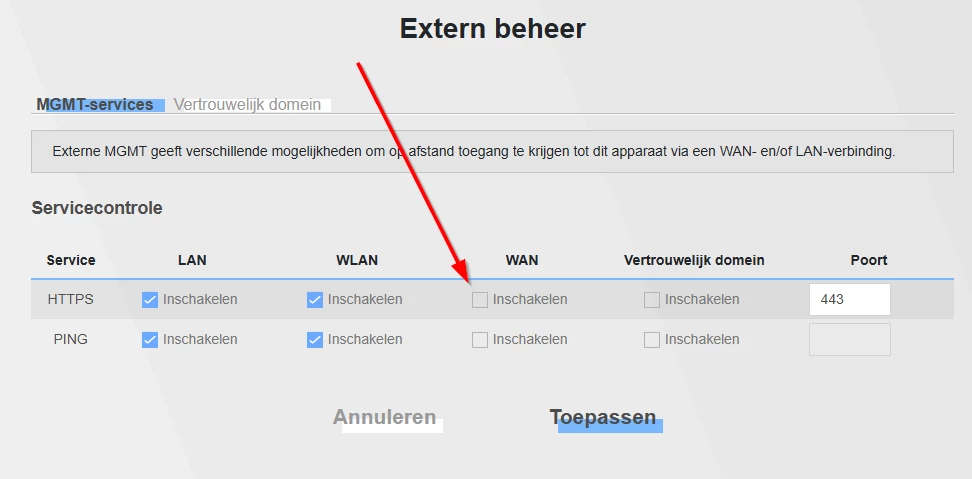
That shouldn’t be possible. At least not from the internet side. If you are on your own network, it depends on the router setting (if it listens on the external ip for it’s own GUI). BTW This would also happen if you used http with your external ip.

When I add the “right” port after the domain URL then I can reach directly my streaming server. Is there a way to reach directly a device (like my streaming server) with a URL (without specifying a port)?

Yes. It depends on the port forwards you setup. You say if you add the correct port it works. Which port is that. Standard HTTP is port 80. HTTPS is port 443. Any other port you define is depending on the server. How are your portforwards defined now?

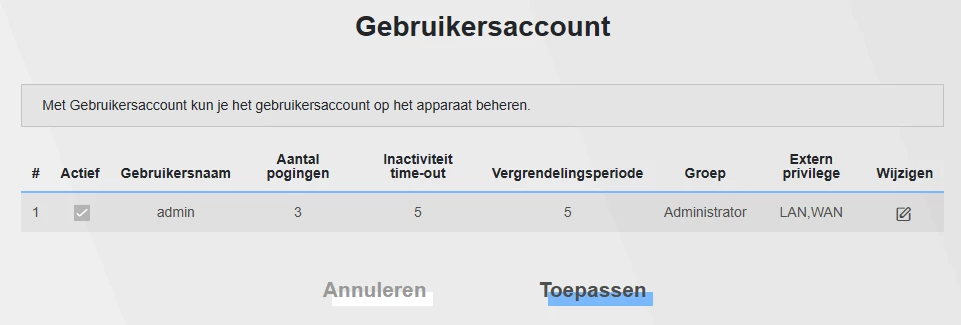
Also, any idea how to change the user name of the “Admin” account of the Zyxel modem?

You can’t change the username for login. You can only change the password. But the GUI shouldn’t be available from the outside. Check the “Extern beheer” if the WAN is not enabled.