Beantwoord

Bad throughput / speed issue with Zyxel NR5307

  • October 24, 2025
  • 8 reacties
  • 231 Bekeken

  • is een nieuwe Poster

Hello,

I am seeing a bad throughput / speed issue with your Kilk & Klaar Zyxel NR5307:

  • Directly connected to the NR5307, I get ~500 Mbps down.

  • When the same device is connected via a gigabit switch (Ubiquiti USW-Lite-8-PoE), speeds are capped at ~150 Mbps.

  • The switch is fine — LAN-LAN traffic between devices runs at ~940 Mbps.

  • In the NR5307 web UI, the LAN1 port (uplink to the switch) shows thousands of dropped packets.

  • I’ve tested different cables, ports, firewall settings, and disabled UPnP/NAT-T — no change.

From my testing, it looks like the NR5307 is not using hardware acceleration (NAT offload) or may be applying QoS/shaping rules to traffic coming via LAN1. Unfortunately, these advanced settings are not visible in the standard admin account.

Could you please check:

  1. If there are QoS or traffic shaping rules applied on the NR5307 that could explain this?

  2. If a firmware update is available that fixes this behaviour?

  3. If not, can Odido provide an alternative solution (e.g. bridge/IP passthrough or replacement CPE)?

Thank you,

Beste antwoord door rvk01

The Zyxel doesn't do Qos. Otherwise a direct connection to the Zyxel would suffer the same.

The Switch might do QoS. You’ll need to check that in the switch settings.

But from the issues I found on the internet with this switch, most are related to the cable. In one instance even with a good cable, in certain configurations it gave the same problems.

You could also try resetting the switch to factory defaults.

That being said… it does seem that Zyxel (with its firmware) sometimes have problems with specific routers. Maybe this is one such instance.


Bekijk origineel

8 reacties

rvk01
  • Antwoord
  • October 24, 2025

The Zyxel doesn't do Qos. Otherwise a direct connection to the Zyxel would suffer the same.

The Switch might do QoS. You’ll need to check that in the switch settings.

But from the issues I found on the internet with this switch, most are related to the cable. In one instance even with a good cable, in certain configurations it gave the same problems.

You could also try resetting the switch to factory defaults.

That being said… it does seem that Zyxel (with its firmware) sometimes have problems with specific routers. Maybe this is one such instance.


walter.v.l
Forum|alt.badge.img
  • is een legendarische user
  • October 24, 2025

The klik and klaar modem does not like managed switches anymore.

There are reports that if you put another device in port 2 the internet download speed increases again. So you can try to put one of the devices on the switch directly into the free port 2.

Or buy an unmanaged switch. 


walter.v.l
Forum|alt.badge.img
  • is een legendarische user
  • October 24, 2025

By the way, this is all related to the latest firmware b17 rolled out in June that fixed a big instability issue. Since then there were reports of users about the phenomenon but no reaction from Odido technical support on this.

See also the following topic that discussed the same issue but then in Dutch 


  • Auteur
  • is een nieuwe Poster
  • October 25, 2025

Thanks. 

  • My switch is not doing any QoS. The problem is definitely on the Zyxel side.
  • As mentioned I have tried diverse cables and ports
  • Since I am not the only one reporting the issue (thanks for sharing that thread ​@walter.v.l ) it definitely looks like shoddy firmware!
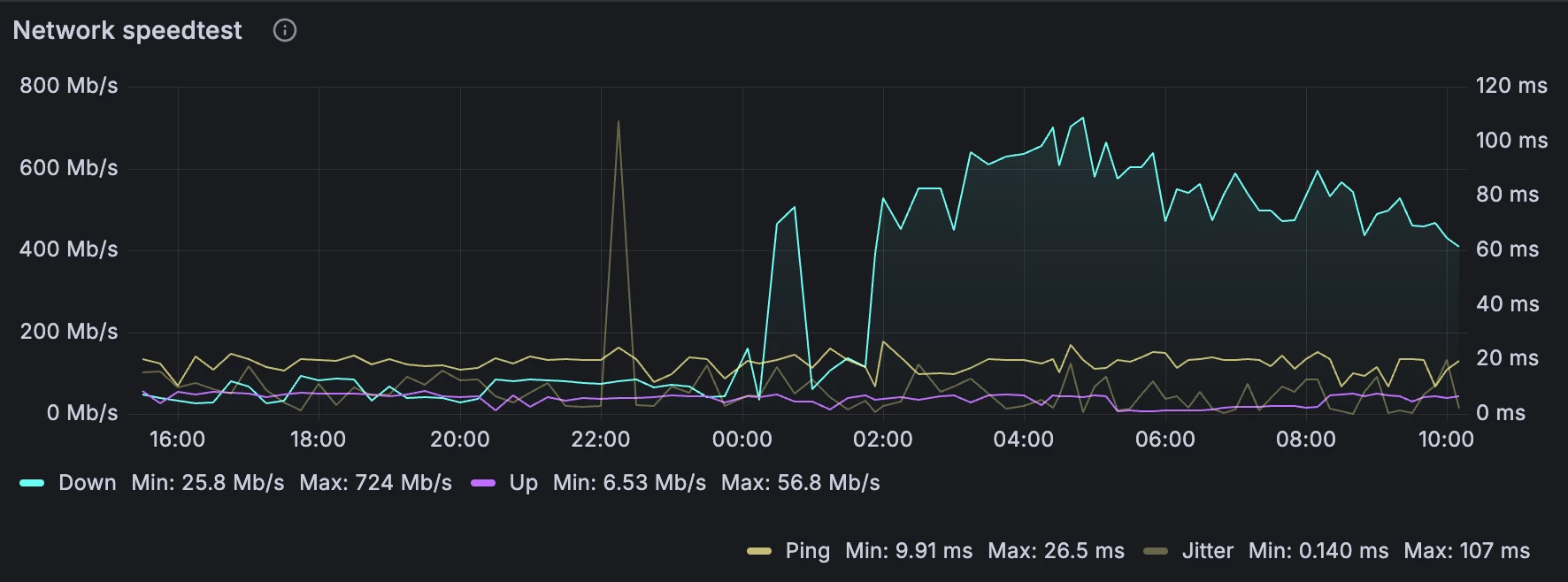
  • You can clearly see below the result of regular speed tests before (connected via switch) and after (connected directly to Zyxel port) 


walter.v.l
Forum|alt.badge.img
  • is een legendarische user
  • October 25, 2025

Did the workarounds I mentioned help you?


  • Auteur
  • is een nieuwe Poster
  • October 25, 2025

​@walter.v.l  I don't want to have to buy an unmanaged switch. :( This should just work.
I have put one of the devices on the switch directly into the free port 2. That solves it for my use case for now, but this really needs to be solved at the firmware level.
Thank you so much for your help.


walter.v.l
Forum|alt.badge.img
  • is een legendarische user
  • October 26, 2025

I agree but this issue has been known for some time now and no interest from the Odido/Zyxel side to fix it yet.

​@Tommie van Odido Any progress on this issue?


Forum|alt.badge.img+4
  • Odido medewerker
  • October 27, 2025

We are looking into it with Zyxel. So far we are not able to replicate it with the managed switches that we have. We are waiting for some of the mentioned switches out of the other thread to get delivered so we can test with these.

As well I would suggest to continue in the other thread to keep all the information central.