Beantwoord

Linksys router Fibreoptic internet


I recently had T-mobile Fibre installed and my current setup is a Linksys EA8300 router, with the old T-mobile Huawei as a bridge (this is how the T-mobile engineer installed it). 

Is there a way to just use the Linksys without the other modem? I read about using the VLAN settings but not sure what T-mobile’s are. 


Thanks

Beste antwoord door Waqqas

Hello @seandehay 

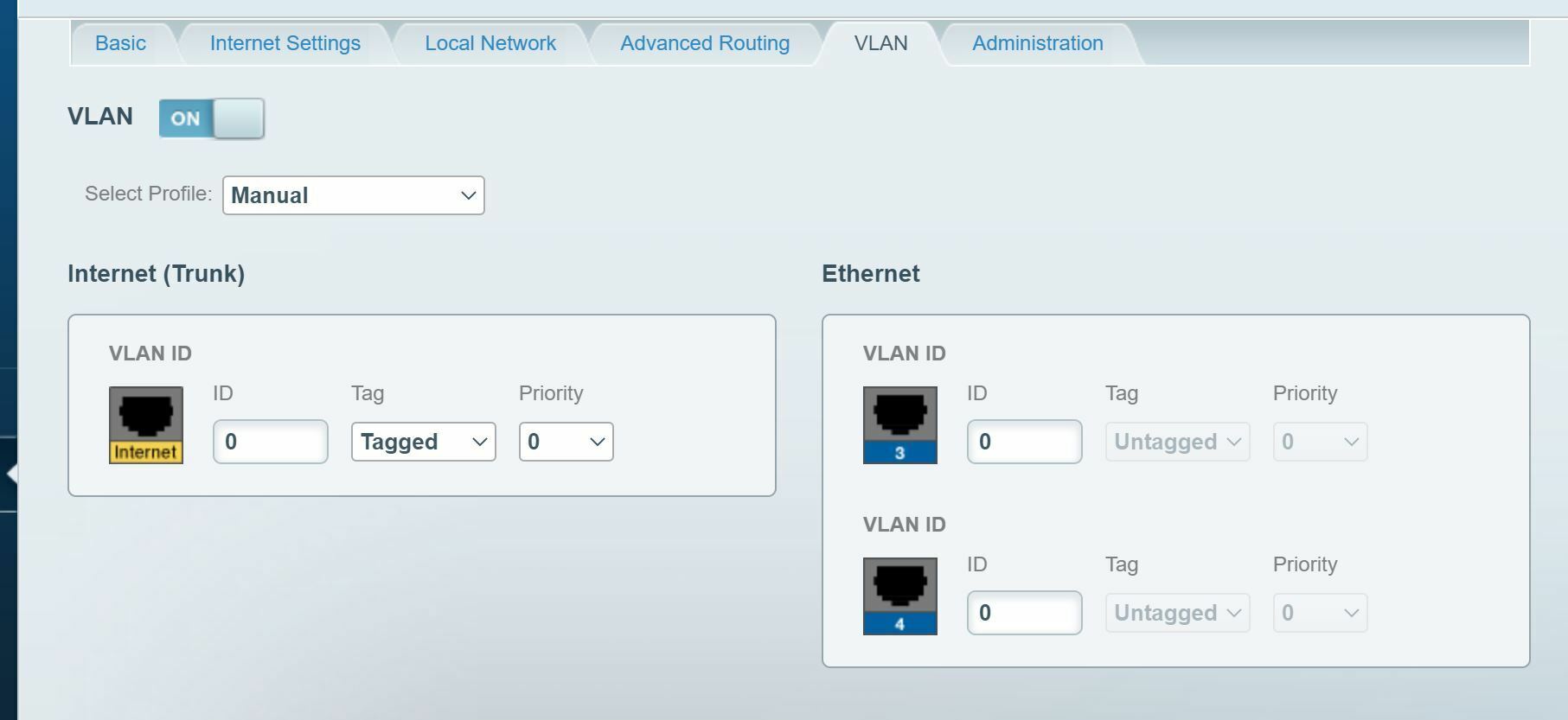
Try vlan 300 tagged priority 0 and profile manual to see of it works.

Restart your router afterwards.

You can leave the Ethernet vlans empty.


Bekijk origineel

10 reacties

Waqqas
Super User
Forum|alt.badge.img+15
  • Odido Superuser
  • April 27, 2021

Hello @seandehay 

If the Linksys is a vlan capable router then you can directly connect it to the mediaconverter using vlan 300 for internet and vlan 640 for IPTV.

Telephone will not work on your own modem.


  • Auteur
  • April 28, 2021

Hi @Waqqas,


Thanks for the reply, it’s just internet we have. Below are the options I have:

So I change the Trunk to 300. Do I need to change any of the Ethernet VLAN’s as I’m using powerline adapters?


Thanks 


Waqqas
Super User
Forum|alt.badge.img+15
  • Odido Superuser
  • Antwoord
  • April 28, 2021

Hello @seandehay 

Try vlan 300 tagged priority 0 and profile manual to see of it works.

Restart your router afterwards.

You can leave the Ethernet vlans empty.


  • Auteur
  • April 28, 2021

Thanks @Waqqas, I’ll give that a try today! 


Boris
Odido
  • Oud-Moderator
  • April 29, 2021

Hi @seandehay ,

Would you let us know if it worked out? I’m curious myself! 😊


  • Auteur
  • April 29, 2021

Hi @Boris,

Yep worked perfectly! Thanks @Waqqas for the advice :thumbsup:


Waqqas
Super User
Forum|alt.badge.img+15
  • Odido Superuser
  • April 29, 2021

Great to hear and enjoy 😉


Hi @Waqqas,


Coming back to this one, any idea why the Linksys would throttle the wired speed? Overall speed is low (around half what the 1000mbps should be) so raised a case with T-mobile. 


However the Linksys wired speed is much slower than the older Hauwei modem. Any ideas?


Lisa
  • Oud-Moderator
  • May 6, 2021

Hi @seandehay, really nice to see how @Waqqas is helping you out! I’m happy to help you further as well. Thanks for notifying, because you shouldn’t experience a slower wired speed with your Linksys router. However I would advise you - if you are still using the setup with the Huawei in the bridge mode - to test with a managed switch behind the Linksys. I also would like to see the result of a speedtest when the Huawei modem is directly wired. Can you please send me a screenshot of the speedtest? Please keep this in mind: 

- The computer has to be connected via ethernet-cable, we can't use a speedtest made at a TV of gaming console.
- We use the speedtest.net speedtest.
- Make sure that the screenshot shows that your computer is connected with a cable by showing the icon of the cabled connection on your computer.

Thanks a lot for the effort. Please let me know if you have any further questions as well! 💪


Hi @Lisa,

Thanks for getting in touch! I actually took the Linksys out of bridge mode and connected it straight to the media converter, but the speeds still seemed super low. I re-ran the tests with the Huawei and only seemed to be getting 200mbps wireless and around 400-500mbps wired. I’ll be running the test again this evening with the Huawei as this was what I was advised to do so I’ll copy the results into here for you as well. 

Thanks for your help so far :)