Intermittent connection drops (10–20 seconds) — router stays reachable, upstream stops responding

  • February 26, 2026
  • 11 reacties
  • 114 Bekeken

Hi everyone,

I’m experiencing intermittent internet outages where the connection drops completely for about 10–20 seconds, then recovers on its own. This happens randomly and disrupts active sessions (SSH, video calls, streaming, etc.).

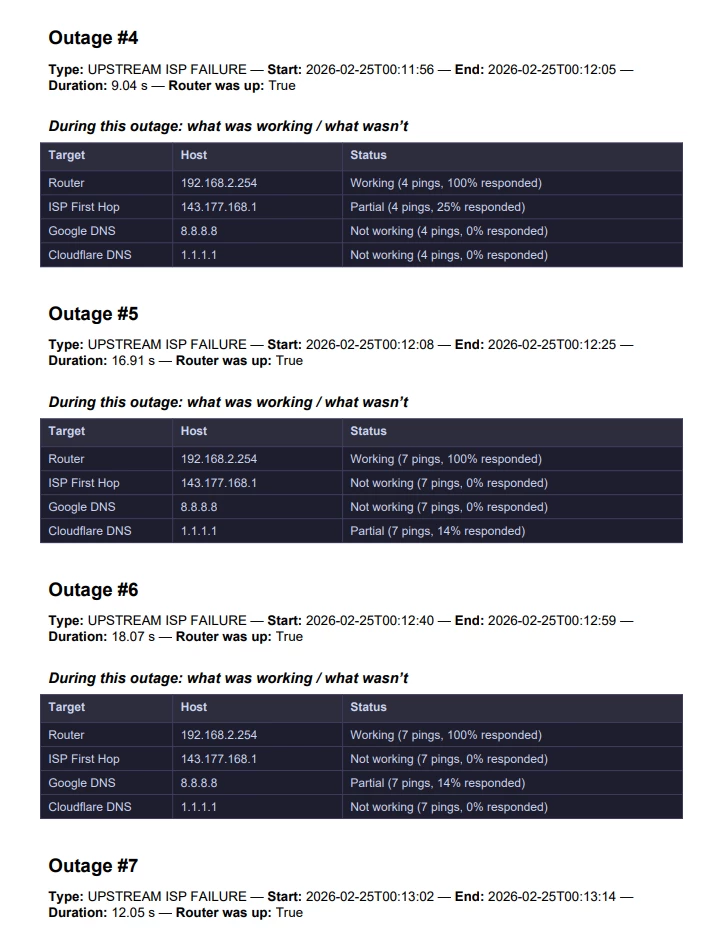
I ran continuous monitoring and noticed the following pattern during each outage:

• My router remains fully reachable (100% ping response)
• The ISP first hop becomes unreachable or partially reachable
• External hosts (Google DNS, Cloudflare DNS) also stop responding

This suggests the issue is not inside my home network but somewhere upstream.

What I’ve already tried:

• Restarted router and modem
• Checked cables and connections
• Verified the issue occurs on both wired and wireless
• Continuous monitoring confirms repeated upstream packet loss

I have detailed logs and reports showing the outages.

Is anyone else experiencing similar short disconnections?
If so, were you able to resolve it, and what was the cause?

Thanks in advance for any advice.

here are a few examples of the outages.
 

February 26, 2026

Hello ​@mortezaadi 

Are you using your own router? In that case first check if the problem also persists with the Zyxel router.

11 reacties

Waqqas
Super User
Forum|alt.badge.img+15
  • Odido Superuser
  • February 26, 2026

Hello ​@mortezaadi 

Are you using your own router? In that case first check if the problem also persists with the Zyxel router.


  • Auteur
  • is een Top Poster
  • February 26, 2026

Hello ​@mortezaadi 

Are you using your own router? In that case first check if the problem also persists with the Zyxel router.

Hello ​@Waqqas 
I'm using Zyxel modem EX5601-T1, which I recieved from Odido, I have a server connected with a wire to the modem and runninn automated ping script to compile the report. 


Waqqas
Super User
Forum|alt.badge.img+15
  • Odido Superuser
  • February 26, 2026

​@mortezaadi 

A factory reset of the router or replacing the cables (also between ONT and router) doesn't help?

Also does the globe turn red when the connection drops?


  • Auteur
  • is een Top Poster
  • February 26, 2026

​@Waqqas 

Yes, I already performed a factory reset of the router, and it did not resolve the issue.

The drops happen infrequently (sometimes once every day or two) and only last about 10–20 seconds, so I don’t have enough time to physically check whether the globe light turns red during the outage.

However, I have continuous monitoring running from my server, and during each outage I still have 100% ping response to my router, so the local connection to the router remains stable.

At the same time, the first hop of Odido (1-168-177-143.ftth.glasoperator.nl – 143.177.168.1) stops responding, which suggests the connection drops upstream rather than between my devices and the router.

That’s why I suspect the issue is outside my home network.


Aibola
  • Debutant
  • February 27, 2026

​@mortezaadi Hello,

I’ve experienced similar problems recently. In my case the problem was outside the home too.

To keep it short.

Check the DHCP renew on the WAN in the Zyxel modem (easiest to export the log and compare the times between a similar message to this one “Jan 22 03:16:29 daemon.info udhcpc: Lease of A.B.C.D obtained, lease time 1800” in my case every time the lease was given out 1 second to late exceeding the 1800 seconds window. So intermittently the lease comes too late and the connection is closed (typical design from a good working DHCP server)

ODIDO technicians managed to modify the renewal time and by doing so the offered lease of the ip now happens within the 1800secs. window and poof gone are the intermittent drops.

I hope this is helpful for you in solving the issue.


  • Auteur
  • is een Top Poster
  • February 27, 2026

​@mortezaadi Hello,

I’ve experienced similar problems recently. In my case the problem was outside the home too.

To keep it short.

Check the DHCP renew on the WAN in the Zyxel modem (easiest to export the log and compare the times between a similar message to this one “Jan 22 03:16:29 daemon.info udhcpc: Lease of A.B.C.D obtained, lease time 1800” in my case every time the lease was given out 1 second to late exceeding the 1800 seconds window. So intermittently the lease comes too late and the connection is closed (typical design from a good working DHCP server)

ODIDO technicians managed to modify the renewal time and by doing so the offered lease of the ip now happens within the 1800secs. window and poof gone are the intermittent drops.

I hope this is helpful for you in solving the issue.

Thanks ​@Aibola will check this, since modem strores limited list of recent logs unfortunatly I don't see the records for the time I experienced the issue will check and let you know.


  • Auteur
  • is een Top Poster
  • February 27, 2026

​@Aibola 
now i don't have the connection but I see these 2 records regarding the ip lease. what should be the normal dhcpd lease time?

590 Feb 27 15:15:47 daemon debug dhcpd dnsmasq-dhcp: ip lease: X.X.X.X , given to MAC: X.X.X.X , with hostname:*, Lease time:1290343
595 Feb 27 15:14:17 daemon info dhcpc udhcpc: Lease of X.X.X.X obtained, lease time 1800

Aibola
  • Debutant
  • February 27, 2026

​@mortezaadi Hello,

I’ve experienced similar problems recently. In my case the problem was outside the home too.

To keep it short.

Check the DHCP renew on the WAN in the Zyxel modem (easiest to export the log and compare the times between a similar message to this one “Jan 22 03:16:29 daemon.info udhcpc: Lease of A.B.C.D obtained, lease time 1800” in my case every time the lease was given out 1 second to late exceeding the 1800 seconds window. So intermittently the lease comes too late and the connection is closed (typical design from a good working DHCP server)

ODIDO technicians managed to modify the renewal time and by doing so the offered lease of the ip now happens within the 1800secs. window and poof gone are the intermittent drops.

I hope this is helpful for you in solving the issue.

Thanks ​@Aibola will check this, since modem strores limited list of recent logs unfortunatly I don't see the records for the time I experienced the issue will check and let you know.

Hi ​@mortezaadi It should have enough space to log the information maybe you can use the option to filter for WAN DHCP and then do the export. Usually looking at a few hours of logging from the DHCP client you should be able to find if it is causing you any troubles being late with the refresh.


  • Auteur
  • is een Top Poster
  • February 27, 2026

​@mortezaadi Hello,

I’ve experienced similar problems recently. In my case the problem was outside the home too.

To keep it short.

Check the DHCP renew on the WAN in the Zyxel modem (easiest to export the log and compare the times between a similar message to this one “Jan 22 03:16:29 daemon.info udhcpc: Lease of A.B.C.D obtained, lease time 1800” in my case every time the lease was given out 1 second to late exceeding the 1800 seconds window. So intermittently the lease comes too late and the connection is closed (typical design from a good working DHCP server)

ODIDO technicians managed to modify the renewal time and by doing so the offered lease of the ip now happens within the 1800secs. window and poof gone are the intermittent drops.

I hope this is helpful for you in solving the issue.

Thanks ​@Aibola will check this, since modem strores limited list of recent logs unfortunatly I don't see the records for the time I experienced the issue will check and let you know.

Hi ​@mortezaadi It should have enough space to log the information maybe you can use the option to filter for WAN DHCP and then do the export. Usually looking at a few hours of logging from the DHCP client you should be able to find if it is causing you any troubles being late with the refresh.

​@Aibola actually this was very helpful, now that I see the logs I’m seeing unusual WAN DHCP activity on my Zyxel EX5601-T1 modem and would like to ask if this is normal or indicates an ISP-side issue. The system log shows the WAN client repeatedly sending DHCP discover requests every few seconds, even though a valid lease is already obtained. For example:

Feb 27 15:05:11 daemon.debug udhcpc: Sending discover...
Feb 27 15:05:15 daemon.debug udhcpc: Sending discover...
Feb 27 15:05:23 daemon.debug udhcpc: Sending discover...
Feb 27 15:05:39 daemon.debug udhcpc: Sending discover...
Feb 27 15:06:12 daemon.debug udhcpc: Sending discover...
Feb 27 15:07:16 daemon.debug udhcpc: Sending discover...
Feb 27 15:08:20 daemon.debug udhcpc: Sending discover...
Feb 27 15:09:20 daemon.info udhcpc: Lease of 143.xxx.xxx.xxx obtained, lease time 1800
Feb 27 15:09:24 daemon.debug udhcpc: Sending discover...
Feb 27 15:09:32 daemon.debug udhcpc: Sending discover...

This pattern continues continuously throughout the day instead of only at lease renewal. At the same time, LAN DHCP works normally (dnsmasq assigns stable 192.168.2.x addresses to devices). This makes me suspect repeated WAN reconnections, DHCP instability, or an ONT/ISP DHCP server issue. Is this expected behavior on this network?


Aibola
  • Debutant
  • February 28, 2026

​@Aibola 
now i don't have the connection but I see these 2 records regarding the ip lease. what should be the normal dhcpd lease time?

590 Feb 27 15:15:47 daemon debug dhcpd dnsmasq-dhcp: ip lease: X.X.X.X , given to MAC: X.X.X.X , with hostname:*, Lease time:1290343
595 Feb 27 15:14:17 daemon info dhcpc udhcpc: Lease of X.X.X.X obtained, lease time 1800


You should only compare lines like 595 if your current lease is 1800 seconds then eventually you would see that the renew is outside 1800 seconds (30 minutes)


Something like this would occur and 1 or 2 seconds can already proof fatal and cause connection drop.

11:15:43    daemon.info udhcpc     Lease of X.X.X.X obtained, lease time 1800
11:45:43    daemon.info udhcpc     Lease of X.X.X.X obtained, lease time 1800
12:15:43    daemon.info udhcpc     Lease of X.X.X.X obtained, lease time 1800

Here your connection drop would be visible as two seconds outside of the 1800 (30 minutes is too slow a response.
12:45:45    daemon.info udhcpc     Lease of X.X.X.X obtained, lease time 1800
13:15:45    daemon.info udhcpc     Lease of X.X.X.X obtained, lease time 1800
13:45:45    daemon.info udhcpc     Lease of X.X.X.X obtained, lease time 1800

Don’t dispear yet it took them almost half a year to even get them to listen to me and take action.

*The proof is in the pudding* 


  • Auteur
  • is een Top Poster
  • February 28, 2026

​@Aibola 
now i don't have the connection but I see these 2 records regarding the ip lease. what should be the normal dhcpd lease time?

590 Feb 27 15:15:47 daemon debug dhcpd dnsmasq-dhcp: ip lease: X.X.X.X , given to MAC: X.X.X.X , with hostname:*, Lease time:1290343
595 Feb 27 15:14:17 daemon info dhcpc udhcpc: Lease of X.X.X.X obtained, lease time 1800


You should only compare lines like 595 if your current lease is 1800 seconds then eventually you would see that the renew is outside 1800 seconds (30 minutes)


Something like this would occur and 1 or 2 seconds can already proof fatal and cause connection drop.

11:15:43    daemon.info udhcpc     Lease of X.X.X.X obtained, lease time 1800
11:45:43    daemon.info udhcpc     Lease of X.X.X.X obtained, lease time 1800
12:15:43    daemon.info udhcpc     Lease of X.X.X.X obtained, lease time 1800

Here your connection drop would be visible as two seconds outside of the 1800 (30 minutes is too slow a response.
12:45:45    daemon.info udhcpc     Lease of X.X.X.X obtained, lease time 1800
13:15:45    daemon.info udhcpc     Lease of X.X.X.X obtained, lease time 1800
13:45:45    daemon.info udhcpc     Lease of X.X.X.X obtained, lease time 1800

Don’t dispear yet it took them almost half a year to even get them to listen to me and take action.

*The proof is in the pudding* 

Technicians told me to replace the CAT5 cable from my modem to fiber device :(