

CGNAT Issue on Fiber Internet

  • February 23, 2026
  • 5 reacties
  • 132 Bekeken

Hello,


I’m using Odido 8Gbit Internet with my own router and Huawei ONT. Recently tried to expose a service to Internet so my friends can connect and we can play some games together which I did in the past a couple of times for weeks and months some times.


Well It didn’t work out. After troubleshooting hours what is wrong with the pc I’m hosting the server and my router config I finally figured It’s because something I can’t control.

When I traceroute on internet, 3rd hop and onwards show IPs in 10.x.x.x range which is a strong indication of CGNAT.
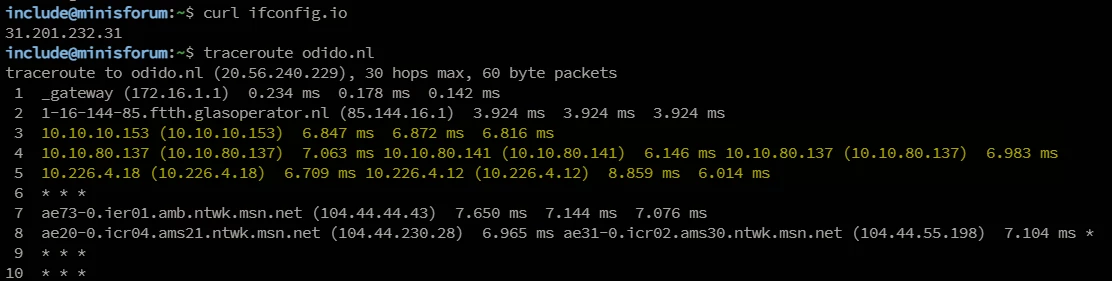

I called the customer services a couple of times but they couldn’t help. Here asking help to how to figure it out. I also think It’s not nice to being put behind a CGNAT as a customer who is paying for the most expensive Internet offering.


February 23, 2026

When I traceroute on internet, 3rd hop and onwards show IPs in 10.x.x.x range which is a strong indication of CGNAT.

As long as your own IP (the you see with ifconfig.io) is not 10.x.x.x, you're not in CGNAT. Besides that, Odido doesn't use CGNAT.

I'm not saying there is nothing wrong with the routing/peering... but it's not CGNAT.

BTW if you use -I (or even -T with sudo) parameter with traceroute it will often complete the route easier. It's just that the default -U (udp) will often fail to reach the destination.

5 reacties

rvk01
  • February 23, 2026

When I traceroute on internet, 3rd hop and onwards show IPs in 10.x.x.x range which is a strong indication of CGNAT.

As long as your own IP (the you see with ifconfig.io) is not 10.x.x.x, you're not in CGNAT. Besides that, Odido doesn't use CGNAT.

I'm not saying there is nothing wrong with the routing/peering... but it's not CGNAT.

BTW if you use -I (or even -T with sudo) parameter with traceroute it will often complete the route easier. It's just that the default -U (udp) will often fail to reach the destination.


  • Auteur
  • is een Master Poster
  • February 24, 2026

When I traceroute on internet, 3rd hop and onwards show IPs in 10.x.x.x range which is a strong indication of CGNAT.

As long as your own IP (the you see with ifconfig.io) is not 10.x.x.x, you're not in CGNAT. Besides that, Odido doesn't use CGNAT.

I'm not saying there is nothing wrong with the routing/peering... but it's not CGNAT.

BTW if you use -I (or even -T with sudo) parameter with traceroute it will often complete the route easier. It's just that the default -U (udp) will often fail to reach the destination.

Ofc Traffic is routed trough a Public IP address, that is irrelevant.


If you can share your traceroute results we can see the difference.(If you are able to reach a service that is hosted in your network from internet)


Im looking If ​@Waqqas or any other Odido people could help.


rvk01
  • February 24, 2026

Ofc Traffic is routed trough a Public IP address, that is irrelevant.

I was trying to say that that 31.x.x.x IP address is not CGNAT. It’s your unique IP address.

If you can share your traceroute results we can see the difference.(If you are able to reach a service that is hosted in your network from internet)

At the moment I’m on a KPN line. So my traceroute doesn’t contain those hops. Those are internal hops from the Odido network, but they don’t indicate CGNAT. They shouldn’t be a reason for blocking incoming connections. You also see them in this topic: 

Im looking If ​@Waqqas or any other Odido people could help.

But we’ll await the expert opinion of ​@Waqqas (or other Odido people although they don’t come here often).


Waqqas
Super User
Forum|alt.badge.img+15
  • Odido Superuser
  • February 24, 2026

Hello ​@include 

All I can say is that Odido doesn't have CGNAT, Odido gives you a dynamic IPv4 address. Those 10.x.x.x IP addresses are switched in the Odido network as far as I know.


  • February 24, 2026

Maybe you should take a look into your own router, it should show the same IP Address as shown with "curl ifconfig.io” on the WAN interface.
